





OCR Purchase Order: Cut Invoice Errors by 99%


Mekari Insight
- Manual data entry remains a major source of procurement and AP errors, causing approval delays, payment issues, and slow reconciliation processes.
- AI-powered OCR automates invoice and PO data capture with up to 98–99% accuracy, significantly reducing processing costs and manual workload.
- Mekari Expense embeds OCR directly into vendor invoice processing and employee expense claims, with local tax support, ISO 27001 certification, and seamless integration with Mekari Jurnal for Indonesian businesses.
Manual data entry is still one of the biggest bottlenecks in procurement and accounts payable. More than 60% of invoice errors come from manual input mistakes, creating delays, vendor disputes, and wasted finance team hours spent re-entering data instead of focusing on strategic work (APQC).
OCR (Optical Character Recognition) for purchase orders solves this by automatically extracting key PO data, such as vendor names, amounts, dates, and line items, directly into procurement and AP systems with up to 98–99% accuracy (Docu Clipper).
In this guide, we’ll explain how OCR purchase order software works, its key benefits, and the best OCR solutions to consider for modern finance teams.

What is OCR for purchase orders?
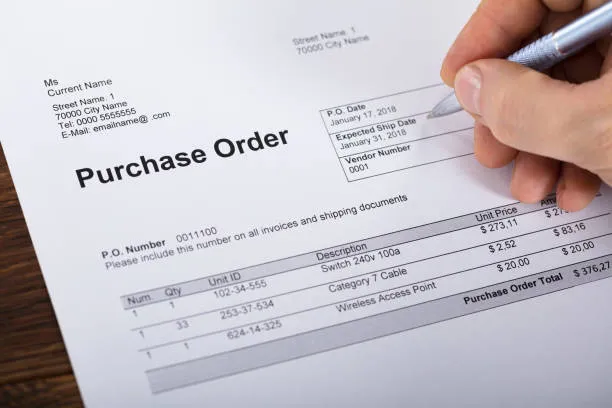
OCR (Optical Character Recognition) is a technology that converts text from scanned documents, PDFs, and photos into machine-readable structured data.
In purchase order processing, OCR automatically scans uploaded PO or invoice documents, recognizes text using AI and machine learning, and extracts key information directly into procurement or AP systems, such as:
- PO number and date
- Vendor name and address
- Line item descriptions, quantities, and unit prices
- Subtotal, tax amounts, and total amount
- Delivery dates and payment terms
Unlike traditional OCR that only reads characters, modern AI-powered OCR understands document structure and context. This allows it to process different vendor formats, poor-quality scans, and multilingual documents more accurately without fixed templates.
OCR acts as the foundation of procurement and procure-to-pay (P2P) automation by reducing manual data entry, improving accuracy, speeding up document processing, and also preventing OCR fraud.
Read More: Top 8 AI Spend Management Tools to Cut Work Time by 30%
How does OCR purchase order processing work?
OCR purchase order processing automates the flow of data from procurement documents into finance and AP systems.
Instead of manually re-entering information, the system captures, extracts, validates, and syncs data automatically through the following workflow:
- Document upload or ingestion
Users upload PO or invoice files in formats such as PDF, PNG, or JPG through a web portal or mobile app. Some systems can also automatically capture documents from vendor emails. - OCR scanning and text extraction
The OCR engine scans the document and converts text into machine-readable data. AI models identify field labels and extract values even when document layouts vary between vendors. - Data parsing and structuring
Extracted information is organized into structured fields such as vendor name, PO date, line items, tax amounts, and totals before being mapped into the target system. - Validation and exception flagging
The system checks extracted data against business rules, purchase orders, or vendor master records. Missing information, mismatches, or suspicious values are automatically flagged for review. - User verification
Finance or procurement teams review the pre-populated fields, make corrections if needed, and approve the document for processing. - System integration and sync
Verified data is automatically synced to ERP, accounting, or AP platforms, eliminating manual re-entry while creating a complete audit trail.
Modern OCR purchase order systems combine OCR engines for text recognition, AI and machine learning for context-aware extraction, validation rules for compliance checks, and API integrations for seamless ERP synchronization.
Read more: Purchase Order Automation: Complete Guide to PO Workflows
Key benefits of OCR for purchase order processing
OCR purchase order processing helps finance and procurement teams reduce manual work, improve accuracy, and accelerate the entire procure-to-pay workflow. Here are the key benefits businesses gain from implementing OCR technology:
- Elimination of manual data entry: OCR automatically extracts PO and invoice data, removing the need for finance teams to manually re-enter vendor details, amounts, and line items.
- Higher accuracy and fewer errors: Modern AI-powered OCR can achieve up to 98–99% accuracy while significantly reducing costly manual entry mistakes and correction delays.
- Faster processing time: OCR speeds up document capture and validation, helping businesses process invoices, approvals, and payments in minutes instead of days.
- Cost reduction: Automated OCR workflows lower invoice processing costs by reducing repetitive administrative work and manual review effort.
- Improved compliance and auditability: OCR creates a searchable digital audit trail while automatically flagging duplicate invoices, missing documents, and policy violations.
- Real-time spend visibility: Extracted data syncs directly into finance systems and dashboards, giving teams faster visibility into procurement and payables activity while simultaneously helping to prevent accounts payable fraud.
- Scalability without headcount increase: OCR systems can process high document volumes simultaneously, allowing businesses to scale operations without expanding AP teams.
Where OCR fits in the procurement and finance workflow
OCR adds the most value at two primary touchpoints in a typical procurement and accounts payable workflow.
1. Purchase invoice processing (accounts payable)
When vendors submit invoices via email, PDF, or portal, OCR automatically captures key fields such as vendor name, invoice number, amounts, line items, VAT/WHT details, and payment terms. From there:
- Extracted data is validated against the corresponding purchase order for two-way or three-way matching
- Approved invoice data syncs directly to the general ledger or ERP, removing manual re-entry entirely
This is where OCR delivers its highest ROI. AP teams processing hundreds of invoices monthly see the greatest reduction in labor and error costs.
Read more: Top 9 OCR Invoice Scanning Software: Cut Costs by 78%
2. Expense claims and reimbursements
Employees upload receipts from business travel, meals, or supplies via mobile or web app. OCR instantly extracts the transaction date, vendor name, and amount, pre-populating the claim form. The employee reviews and confirms the data before submitting, with no manual transcription required.
This is particularly valuable for companies managing high volumes of employee expense claims across multiple departments or branches.
Note that OCR is most powerful when embedded within a broader AP automation or expense management platform, not used as a standalone scanner. The real value comes from the downstream automation, such as routing, matching, and payment processing, that follows data capture.
What to look for in an OCR purchase order solution
When evaluating OCR purchase order software, businesses should look beyond basic text extraction and assess how well the system supports automation, accuracy, and integration across the full procurement workflow.
- Extraction accuracy: Look for solutions with 98%+ accuracy on invoices and non-standard document layouts.
- Supported file types: Ensure support for PDF, PNG, JPG, and automatic email ingestion.
- AI/ML capability: Template-free AI OCR adapts better to varied vendor formats and reduces setup effort.
- Field coverage: The system should extract line items, taxes, totals, VAT, and WHT fields accurately.
- ERP and accounting integration: Native integrations eliminate manual exports and duplicate data entry.
- Validation and matching: Built-in PO matching and compliance checks reduce exception handling workload.
- Security and compliance: Prioritize ISO 27001 certification, encryption, and role-based access controls.
- Deployment model: Cloud-based solutions provide faster implementation and easier scalability.
- Local regulatory support: Indonesian businesses should ensure support for PPN/VAT, PPh/WHT, and local document formats.
Read more: Top 9 Logistics OCR Software to Cut 15% Document Processing Cost
Streamline purchase order with Mekari Expense OCR
Manual data entry remains one of the biggest bottlenecks in finance and procurement workflows. OCR purchase order software Mekari Expense helps businesses streamline these processes with AI-powered OCR built directly into two of the most critical finance workflows: purchase invoice processing and employee expense claims.
OCR in purchase invoice (accounts payable)
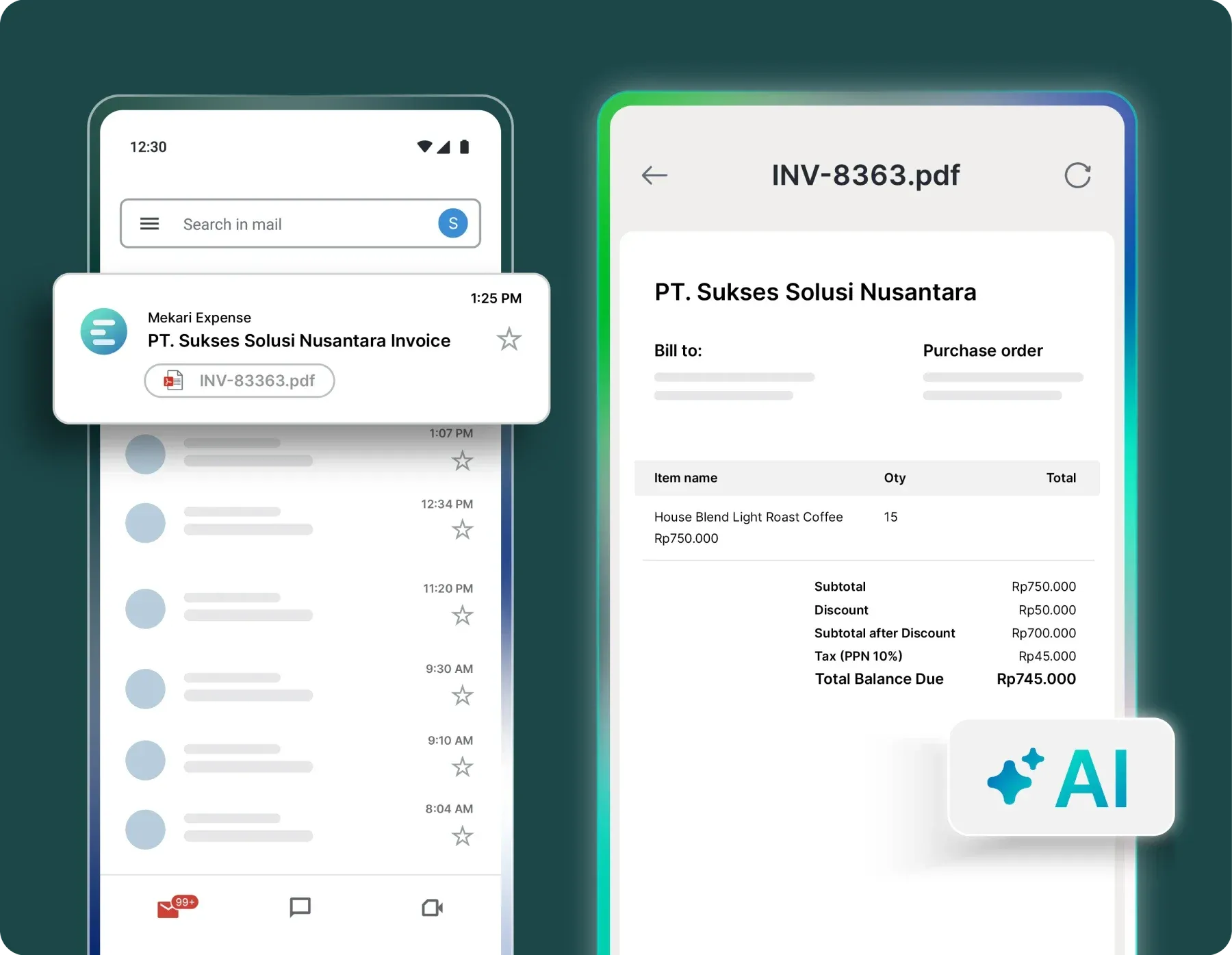
Vendor invoices can be uploaded manually in PDF, PNG, or JPG formats, or captured automatically from vendor emails. The system extracts key data such as vendor name, invoice date, amounts, line items, and VAT/WHT details before syncing validated data directly into the Purchase Invoice module.
OCR in my claims (reimbursement and cash advance)
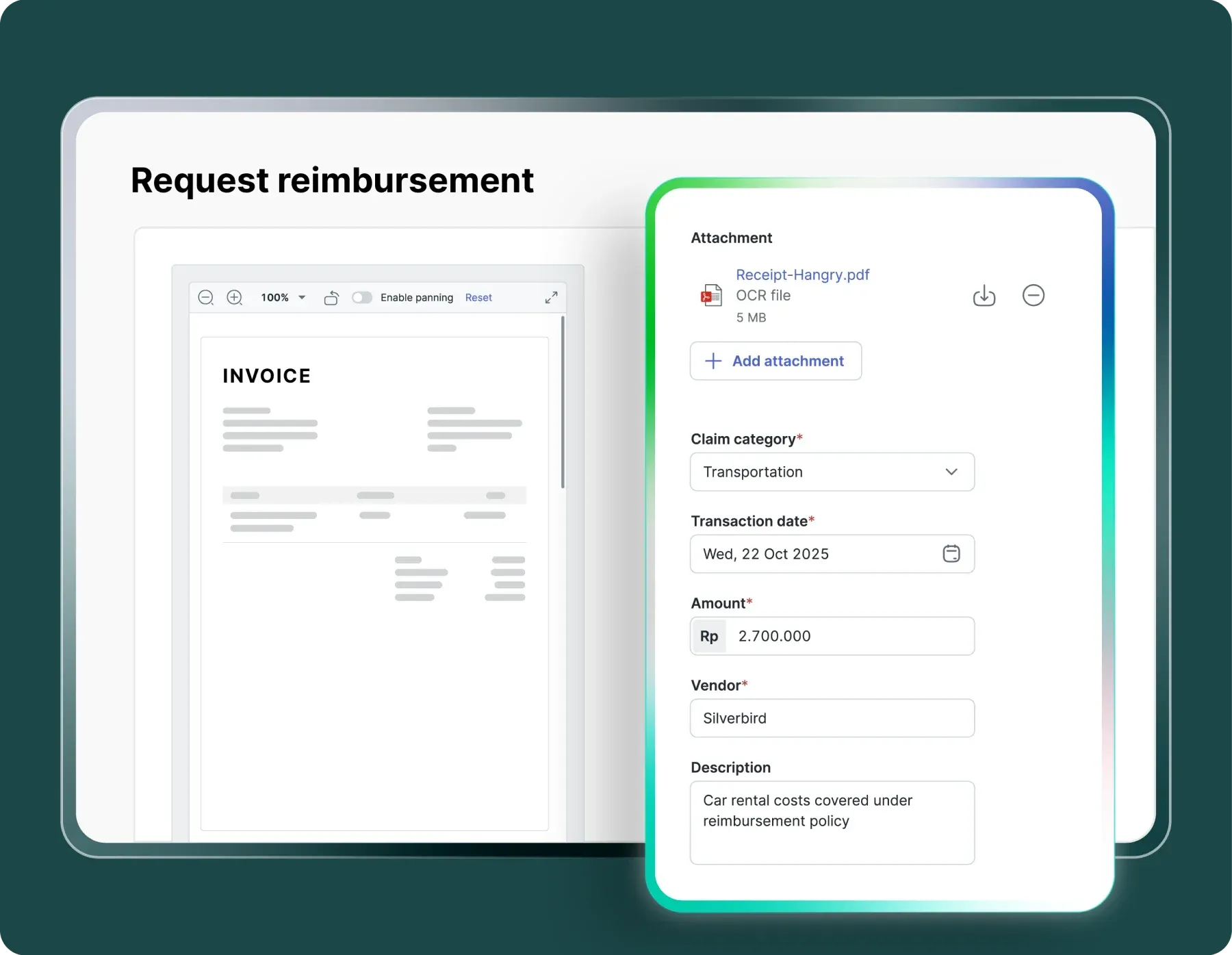
Employees can upload receipt images directly from the app, while OCR automatically extracts transaction dates, vendor names, and amounts to pre-fill claim forms before submission.
Key benefits for businesses include:
- Eliminates manual input processes that are time-consuming and prone to human error
- Accelerates reimbursement claims, cash advance settlements, and purchase invoice processing
- Supports the two most essential and high-volume finance workflow touchpoints
- Handles local VAT/WHT tax fields natively for Indonesian businesses
- Integrates seamlessly with Mekari Jurnal for automatic reconciliation
- ISO 27001 certified for secure and compliant financial operations
Now the expense submission process is much faster — even at 10 PM without waiting until the next day. Paperless, everything is recorded automatically, and errors are reduced.
Founder & CEO, Sentral Komputer
Explore purchase order system from Mekari Expense to automate procurement and expense workflows end-to-end.
References and methodology
Methodology
Methodology
Articles published by Mekari Expense are developed using trusted sources, including official data, company reports, academic research, and insights from industry practitioners. Whenever possible, we refer directly to primary sources before drawing conclusions. Our editorial team reviews and verifies the information to ensure accuracy and relevance. All references are listed so readers can trace each piece of information back to its original source.
Our editorial standards
Our editorial standards
- Primary source first: We consult official product documentation and pricing pages directly, not secondhand summaries or aggregator sites.
- Fact-checking: All product features, pricing, and claims are cross-verified against each platform’s official website at the time of writing.
- No paid placement: Tools are selected based on relevance and fit for Indonesian businesses, not commercial arrangements. Mekari Expense is included as a first-party product and is transparently labeled as such.
- Regular review: Articles are periodically updated to reflect product changes or shifts in market relevance.
References
References
Unstract. ‘’Guide to Purchase Order OCR — Extract Data from Purchase Order’’
FAQ
1. What is OCR in the context of purchase orders?
1. What is OCR in the context of purchase orders?
OCR (Optical Character Recognition) for purchase orders is a technology that automatically reads and extracts key data from PO and invoice documents — such as vendor name, amounts, line items, dates, and tax details — and converts it into structured digital data, eliminating the need for manual typing.
2. How does OCR help reduce errors in procurement and AP?
2. How does OCR help reduce errors in procurement and AP?
Manual data entry error rates range from 1–4%, and each error takes an average of 8.3 days to resolve. OCR reduces this by automatically extracting data at 98–99% accuracy, flagging discrepancies in real time, and routing exceptions before they propagate downstream into payment errors or compliance issues.
3. What file formats does OCR purchase order software typically support?
3. What file formats does OCR purchase order software typically support?
Most modern OCR solutions support PDF, PNG, and JPG at a minimum. Many also support scanned documents and automatic capture from vendor email attachments — meaning invoices sent directly from suppliers can be ingested and processed without any manual upload step.
4. What should Indonesian businesses specifically look for in an OCR solution?
4. What should Indonesian businesses specifically look for in an OCR solution?
Indonesian businesses should prioritize solutions that handle local tax fields natively (PPN/VAT and PPh/WHT), comply with Indonesian regulatory standards, support Indonesian document formats, and integrate directly with local accounting systems. Mekari Expense is designed specifically for this context — with built-in OCR available for both Purchase Invoice and expense claims modules.
5. How does Mekari Expense's OCR feature work for reimbursements and purchase invoices?
5. How does Mekari Expense's OCR feature work for reimbursements and purchase invoices?
In Mekari Expense, OCR is available at two points: (1) in My Claims — when employees upload receipts for reimbursement or cash advance settlement, OCR pre-fills transaction date, vendor, and amount automatically; and (2) in Purchase Invoice — when vendor invoices are uploaded (PDF, PNG, JPG) or captured from vendor emails, OCR extracts invoice data including VAT/WHT details and syncs it directly into the AP module. Users verify extracted data before final submission.