





Purchase Order Automation: Complete Guide to PO Workflows


Mekari Insight
- Manual PO processes are slower and costlier than most businesses realize. Processing a single purchase order manually can cost anywhere from $35 to over $500, and workflows that should take hours routinely stretch into days, creating compounding inefficiencies across the entire procurement cycle.
- Purchase order automation delivers measurable gains across speed, accuracy, and control. From automated approval routing to three-way matching and real-time spend visibility, automation can cut PO cycle times by 50 to 70% and reduce ordering costs by up to 52%, without adding headcount.
- Looking to streamline procurement from request to payment? Mekari Expense Procurement brings PO creation, multi-level approvals, AI-powered OCR, vendor management, and accounting integration into one unified platform, purpose-built for businesses operating in Indonesia and beyond.
Purchase order processes remain a major bottleneck for many businesses. Despite ongoing digital transformation, many invoices still require manual handling, leading to delays, errors, and limited visibility. In fact, only around 32.6% of invoices are processed straight-through without human intervention (Nanonets).
The cost impact is also significant. Manual PO processing can range from $35 to over $500 per order, with workflows that should take hours often stretching into days. (Turing IT Labs)
This is where purchase order automation comes in, helping businesses streamline procurement into a faster and more accurate process. In this guide, we will cover how PO automation works, its benefits, and how to implement it effectively.

What is purchase order automation?
Purchase order automation is the use of digital tools and software to streamline the creation, approval, and tracking of purchase orders with minimal manual involvement.
It replaces traditional processes like paper forms, email chains, and manual follow-ups, allowing workflows that typically take 2–3 days to be completed in just a few hours.
Instead of handling procurement step by step, businesses can automate the entire flow through:
- Digital purchase requisition forms to standardize requests
- Automated approval workflows to eliminate bottlenecks
- Instant PO generation based on approved requests
- Electronic transmission to vendors for faster processing
- Automated three-way matching to verify invoices, POs, and receipts
As a result, purchase order automation becomes a key foundation for broader procurement automation and procure-to-pay (P2P) processes, helping businesses gain better control, speed, and visibility across spending.
How does purchase order automation work?
Purchase order automation streamlines the entire procurement flow from request to payment by replacing manual steps with system-driven workflows. Here’s how the process typically works:
1. Purchase requisition
Employees submit requests through digital forms with standardized fields, pre-filled data, and validation rules to reduce errors from the start.
2. Automated approval routing
The system automatically routes requests to the right approvers based on rules like budget thresholds, department, or item type. Approvals can be done quickly through notifications with just one click.
3. PO generation
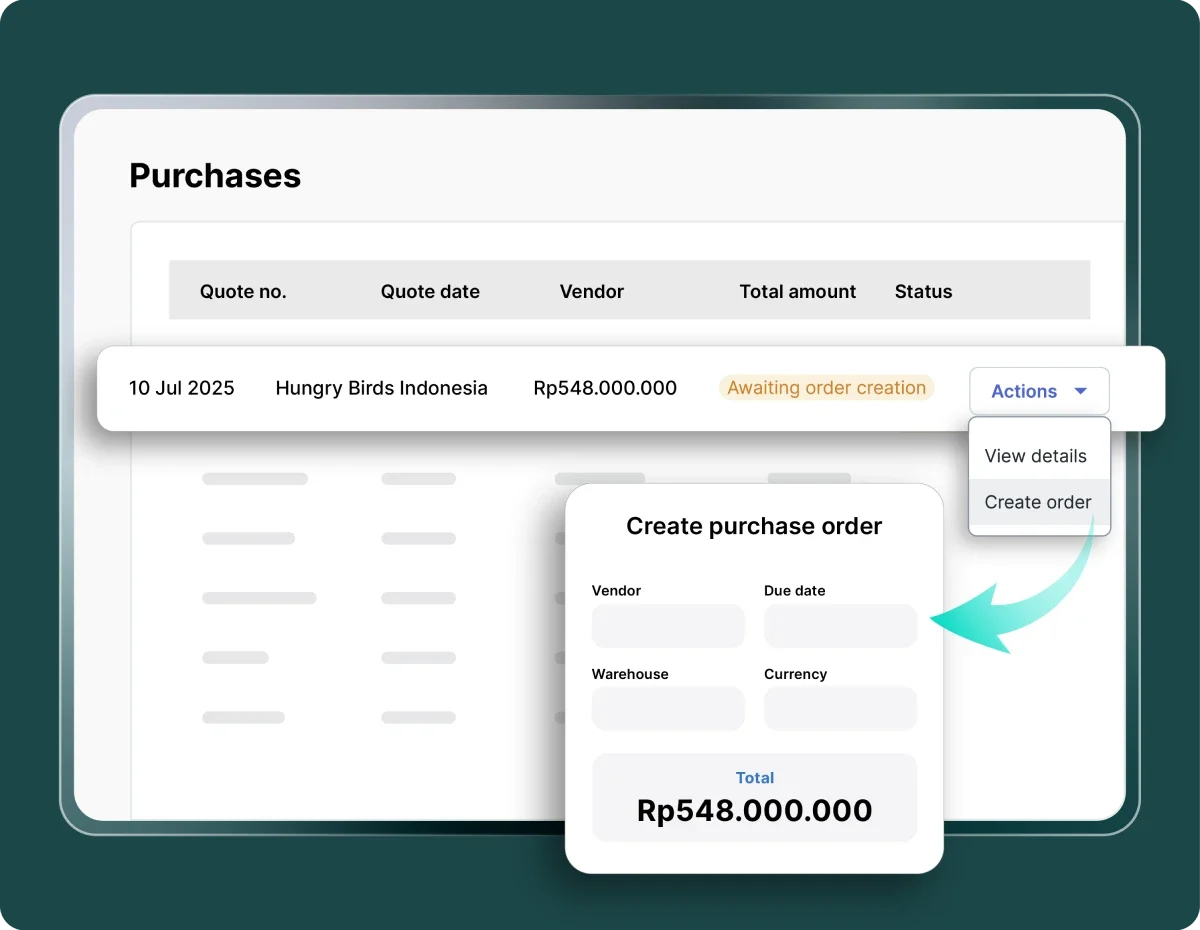
Once approved, the system instantly creates a purchase order using pre-configured templates, with vendor details, pricing, and terms filled in automatically.
Read more: OCR Purchase Order: Cut Invoice Errors by 99%
4. Electronic transmission
The PO is sent directly to vendors via email, vendor portals, or EDI, eliminating manual sending and follow-ups.
5. Receiving and matching
The system tracks deliveries and performs automated two-way or three-way matching between the PO, invoice, and goods receipt to ensure everything is accurate before payment.
Behind the scenes, this process is powered by technologies such as RPA for finance, AI and machine learning for data extraction, OCR for document processing, workflow engines for approval logic, and ERP integrations to keep financial data in sync.
Key benefits of purchase order automation
Adopting purchase order automation does not just improve speed, it also brings measurable improvements across cost, accuracy, and control. Here are the key benefits businesses can expect:
- Time savings and efficiency: Automation can reduce PO cycle time by 50–70%, turning tasks that used to take hours into processes completed in minutes.
- Error reduction: Minimizes manual data entry mistakes such as typos and duplicate orders, with some systems improving accuracy by over 90%.
- Cost savings: Leading companies have reduced ordering costs by up to 52%, while also eliminating expenses for paper, printing, and postage.
- Real-time visibility: Centralized dashboards provide instant insight into PO status, spending patterns, and budget usage.
- Improved compliance: System rules automatically enforce company policies, approval hierarchies, and vendor restrictions.
- Better supplier relationships: More accurate orders and timely payments help build vendor trust and can lead to better negotiation terms.
- Audit trail: Every action is recorded, making it easier to track activities and support audits or reporting.
- Scalability: Businesses can handle increasing transaction volumes without needing to expand their team.
Challenges of manual PO processes (why you need automation)
Before understanding the value of automation, it’s important to look at the common challenges businesses face when managing purchase orders manually:
- Paper-heavy and time-consuming: Manual processes rely on paperwork, repeated hand-offs, and slow approval cycles that delay procurement.
- Prone to human error: Manual data entry often leads to incorrect quantities, pricing mistakes, or even duplicate orders.
- Approval bottlenecks: Requests get stuck in email inboxes with no clear visibility into approval status or delays.
- Lack of visibility: Tracking POs through spreadsheets and emails makes it difficult to monitor real-time spend and procurement status.
- Maverick spending: Employees may purchase from unapproved vendors or outside contracts due to lack of control.
- Invoice matching challenges: Manual two-way or three-way matching is tedious, time-consuming, and highly error-prone.
Read more: Procurement Fraud: How to Spot Signs and Prevent Schemes
Purchase order automation use cases by industry

Purchase order automation is not limited to one sector. It can be adapted across industries to streamline procurement based on specific operational needs:
- Manufacturing: Automate raw material procurement, MRO (maintenance, repair, operations) purchasing, and trigger reorders automatically when inventory reaches certain thresholds.
- Retail: Enable automatic inventory replenishment based on sales data, manage seasonal purchasing, and streamline fulfillment material procurement for D2C operations.
- Healthcare: Ensure compliant pharmaceutical procurement, manage medical supply orders, and handle capital expenditure approvals with proper governance.
- Education: Simplify procurement of learning materials, manage service contracts, and maintain structured vendor relationships.
- General business: Streamline purchasing of office supplies, IT equipment, and professional services while maintaining clear spend controls.
To illustrate the impact, a company handling around 12,000 purchase orders annually (100 partners × 10 POs per month) was able to save approximately 2,000 hours per year after implementing automation.
In another case, EnBW achieved an 80% increase in order automation and improved procurement efficiency by 10%, showing how automation can deliver both time savings and operational improvements at scale.
Read more: Building Retail Procurement Operating Model That Saved $500M
How to implement purchase order automation
Implementing purchase order automation is not just about adopting new software, but also redesigning workflows to be more efficient, controlled, and scalable. A structured approach helps ensure smooth adoption and long-term success.
1. Assess current process
Start by mapping your existing purchase order workflows end-to-end, from requisition to payment. Identify bottlenecks such as approval delays, manual data entry, or duplicate work.
Establish baseline metrics like average cycle time, error rate, cost per PO, and number of touchpoints to measure future improvements.
2. Define goals
Set clear, measurable objectives aligned with business priorities. For example, reduce PO cycle time by 30–50%, achieve 80–90% touchless processing, or improve spend visibility across departments.
Having defined KPIs ensures you can track ROI and success post-implementation.
3. Select software
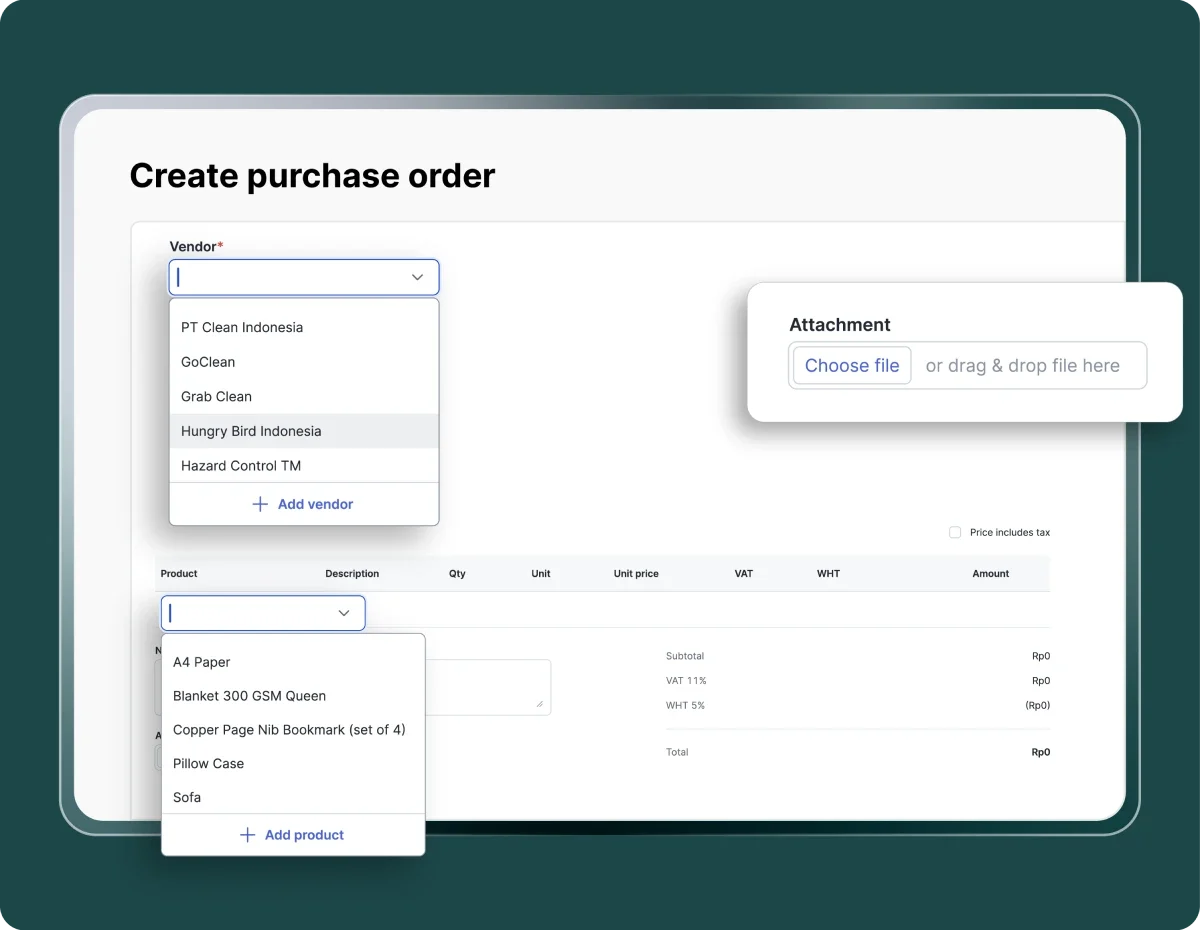
Choose a solution that fits your business complexity and growth plans.
Key evaluation criteria include ERP and accounting integration, workflow customization, ease of use for non-technical users, scalability, compliance capabilities, and total cost of ownership. It is also important to consider vendor support and implementation services.
Read more: Best 8 Cloud Purchase Order System that Cut PO Cost 70%
4. Configure workflows
Design approval workflows that reflect your internal policies. Set rules based on budget thresholds, departments, or categories.
Define vendor restrictions, standardize PO templates, and implement controls to prevent maverick spending. This ensures governance is built into the system from the start.
5. Integrate systems
Integrate the PO automation tool with existing systems such as ERP, accounting, inventory, and vendor management platforms.
For an enterprise-scale implementation, businesses can leverage an RPA service from Netmarks Indonesia to ensure seamless integration between the PO automation tool and existing infrastructure
This enables real-time data synchronization, reduces duplicate entries, and ensures financial records remain accurate and up to date.
Top 7 Procurement Automation Software to Streamline Procurement Cycle
6. Pilot program
Begin with a controlled rollout, such as one department or a specific category of spend, over a period of 4–8 weeks. Monitor performance against baseline metrics, identify issues early, and gather feedback from users to refine workflows before full deployment.
7. Train users
Provide role-based training for employees, approvers, and finance teams. Focus not only on how to use the system, but also on why the change matters. Address resistance proactively and highlight early wins to build momentum and encourage adoption across teams.
8. Scale and optimize
After a successful pilot, expand the implementation across departments and locations. Continuously monitor KPIs such as cycle time, compliance rates, and cost savings.
Use analytics to identify further optimization opportunities, refine workflows, and ensure the system evolves with your business needs.
Best practices for purchase order automation
To get the most value from purchase order automation, businesses need to go beyond implementation and focus on how the system is used and optimized over time:
- Standardize before automating: Fix inefficient or inconsistent processes first to avoid scaling existing problems.
- Start small: Roll out automation in phases to reduce risk, test workflows, and learn before expanding.
- Focus on user adoption: Ensure employees actually use the system by investing in training, clear communication, and change management.
- Integrate deeply: Connect PO automation with ERP, accounts payable, and inventory systems to maximize efficiency and data accuracy.
- Use dynamic approval workflows: Set rules so low-value purchases can be auto-approved, while higher-value transactions follow stricter approval paths.
- Leverage analytics: Use reporting tools to identify cost-saving opportunities, monitor vendor performance, and improve spending decisions.
- Continuous improvement: Regularly review performance metrics and refine workflows as business needs evolve.
Read more: 10 Best Inventory Invoice Software to Manage Stock and Billing
Top purchase order automation software solutions
There are many purchase order automation tools available, each designed for different business sizes and needs. Here’s a quick overview:
- Enterprise solutions: SAP Ariba and Coupa are built for large, global organizations with complex procurement requirements and multi-entity operations.
- Mid-market leaders: Precoro, Procurify, and Fraxion offer strong functionality with faster implementation, making them suitable for growing companies.
- SMB-focused tools: Order.co, Tradogram, and Spendwise are designed for smaller teams looking for simple, easy-to-use procurement solutions.
- Integrated solutions: QuickBooks, Odoo, and NetSuite provide built-in PO automation features for businesses already using their ecosystems.
- AI-powered options: Nanonets, Zapro, and Wend AI focus on intelligent automation, including document processing, data extraction, and workflow optimization.
When choosing a solution, consider key factors such as ERP integration, ease of use, workflow customization, support for two-way or three-way matching, reporting capabilities, and total cost of ownership.
How Mekari Expense can automate your purchase order process
Managing purchase orders manually often leads to fragmented workflows, limited visibility, and uncontrolled spending.
Mekari Expense is designed to solve this by providing a comprehensive spend management software with procurement module that automates and simplifies the entire purchase order lifecycle, from request to payment.
Here are the key features that enable end-to-end PO automation:
- Integrated purchase request and PO creation: Requests, approvals, and PO creation are managed in one unified system, ensuring every transaction is recorded automatically and eliminating duplicate or missing requests.
- Multi-level approval workflows: Each request follows a structured approval flow based on your company’s hierarchy, helping ensure every purchase aligns with policies and budget controls.
- End-to-end purchasing integration: Create POs, manage invoices, and process payments seamlessly within a single platform, including support for global vendor transactions with real-time exchange rates and automatic reconciliation.
- AI-powered OCR technology: Scan invoices and automatically extract data into the system without manual input, reducing errors and saving significant processing time.
- Vendor management: Control and verify vendors through customizable approval statuses such as unverified, pending, and verified, helping prevent transactions with unauthorized suppliers.
- International payments: Pay overseas vendors with real-time currency conversion, ensuring more accurate and efficient cross-border transactions.
- Seamless integration: Connect directly with Mekari Jurnal to automate accounting and reconciliation, creating a fully integrated financial workflow across systems.
Ready to transform your procurement process? Mekari Expense offers a free trial so you can experience how automation improves efficiency, control, and visibility across every purchase order.
References
Brex. ‘’What is Purchase Order Automation and How Do I Set It Up?’’
IBM. ‘’Purchase Order Automation’’
Ivalua. ‘’Purchase Order Automation: How to Automate PO Approvals’’
FAQ
1. What types of businesses benefit most from purchase order automation?
1. What types of businesses benefit most from purchase order automation?
Purchase order automation is valuable across industries and company sizes. Whether you are in manufacturing, retail, healthcare, or general business services, the core benefits, faster cycle times, fewer errors, and better spend control, apply broadly. Even smaller teams can benefit, as SMB-focused tools are designed specifically for simpler, leaner procurement needs.
2. How is purchase order automation different from simply digitizing forms?
2. How is purchase order automation different from simply digitizing forms?
Digitizing forms only moves paperwork online. Purchase order automation goes further by connecting every step of the procurement flow, from reuisition and approval routing to PO generation, vendor transmission, invoice matching, and payment, into a single automated workflow. The key difference is that the system makes decisions and triggers actions based on predefined rules, rather than waiting on manual input at each stage.
3. What is three-way matching and why does it matter in PO automation?
3. What is three-way matching and why does it matter in PO automation?
Three-way matching is the process of verifying that the purchase order, the vendor invoice, and the goods receipt all align before a payment is approved. In manual processes, this is one of the most time-consuming and error-prone steps. Automation handles this automatically, flagging discrepancies in real time and reducing the risk of overpayments or fraudulent invoices slipping through.
4. How do you prevent employees from bypassing the PO process entirely?
4. How do you prevent employees from bypassing the PO process entirely?
This is known as maverick spending, and it is one of the most common challenges in procurement. Automated systems address this by enforcing vendor restrictions, reuiring approvals before purchases are made, and providing employees with a simple, accessible digital interface that makes following the process easier than working around it.
5. What should we set up before implementing PO automation?
5. What should we set up before implementing PO automation?
Before selecting a tool, it helps to map your existing procurement workflow end to end and identify where the biggest bottlenecks occur. Standardizing processes first, rather than automating broken ones, is critical. From there, define clear goals such as target cycle times or touchless processing rates, and ensure your chosen platform integrates with your existing ERP and accounting systems for seamless data flow.