

21 mins read

13 Best Invoice Software for Small Business to Reduce Errors 59%

Invoice Software for Small Business

Mekari Insight

  • Invoice software for small business is a digital solution that helps SMBs and companies to create, send, track, and manage invoices more efficiently across the entire billing lifecycle.
  • Modern invoicing software like Mekari Expense, Spendesk, Sage, Zoho Invoice, and Wave offer features such as automated invoice capture, approval workflows, and real-time payment tracking to help small businesses improve cash flow visibility.
  • Mekari Expense excels as the best invoice software for small business because it offers a unified spend management software, not just basic invoicing solution, enabling businesses to automate approvals, control spending, and integrate invoice management with accounting in one platform.

Most small businesses don’t lose cash flow because of bad revenue, but because mounting vendor invoices, delayed approvals, and missed payment deadlines that result in penalties.

And it’s more common than it should be. Rippling reported that 39% of manually processed invoices contain errors, and 86% of SMBs are still running their invoice processing this way.

Invoice software automates the entire vendor invoice cycle, so approvals don’t stall, payments don’t slip, and the finance team isn’t manually chasing paperwork.

This invoicing solution gives small businesses real-time visibility into every invoice โ€” what’s pending, what’s approved, and what’s overdue.

This guide covers the eight best invoice software options available for small businesses in 2026, what each one does well, and how to choose the right one for your business.

What is invoice software and what it serves for small businesses

Invoice software is a digital tool that creates, sends, tracks, and manages invoices to replace the manual, spreadsheet-based billing workflows that most small businesses still rely on.

Unlike basic accounting software, this invoicing solution is built specifically around the invoice lifecycle: from generating an invoice and routing it through the right workflow, to collecting or scheduling payment and reconciling it against your accounting records.

Simply put, accounting software records what has happened, while invoice software manages the process as it happens.

For small businesses, switching from manual invoicing to dedicated software delivers several measurable advantages:

  • Fewer errors and exceptions: Automated data capture reduces the 59% error and exception rate common in manually processed invoices, according to Gennai.
  • Faster payment cycles: Structured approval workflows and automated reminders eliminate delays caused by lost emails and manual follow-ups. Therefore, invoice processing time goes faster by 82%, as reported by Ardent Partners.
  • Better cash flow visibility: Real-time tracking shows exactly where every invoice stands, from submission to payment.
  • Less administrative overhead: Finance teams spend less time chasing approvals and more time on higher-value work.
  • Scalability: Invoice software grows with your business, handling higher invoice volumes without adding headcount or complexity.
  • Professional business relationships: Branded invoices, on-time payments, and clear billing records build trust with both clients and suppliers โ€” and open the door to better terms on both sides.

Modern invoice software has also expanded well beyond simple billing. Today’s platforms include AI-powered OCR for automatic invoice capture, multi-level approval workflows, recurring billing, client portals, and direct accounting integration.

This makes invoice software a core operational tool for small businesses managing both sides of the billing cycle โ€” accounts receivable for collecting client payments, and accounts payable for paying vendors on time.

Best Invoice Software for Small Businesses for Full AP Automation

Most small businesses reach a point where basic invoicing tools stop being enough. When invoice volume grows, approval chains get longer, or vendor payments cross borders, you need software built around the full accounts payable cycle โ€” not just invoice creation and payment reminders.

The tools below are built for that layer of complexity. Each one handles the AP workflow end-to-end: invoice capture, multi-level approval routing, payment processing, and accounting reconciliation. They vary in scale and pricing โ€” from free entry points to enterprise-grade platforms โ€” but all offer meaningful AP automation that basic billing tools cannot replicate.

1. Mekari Expense

Mekari Expense - Best Invoice Software for Small Business

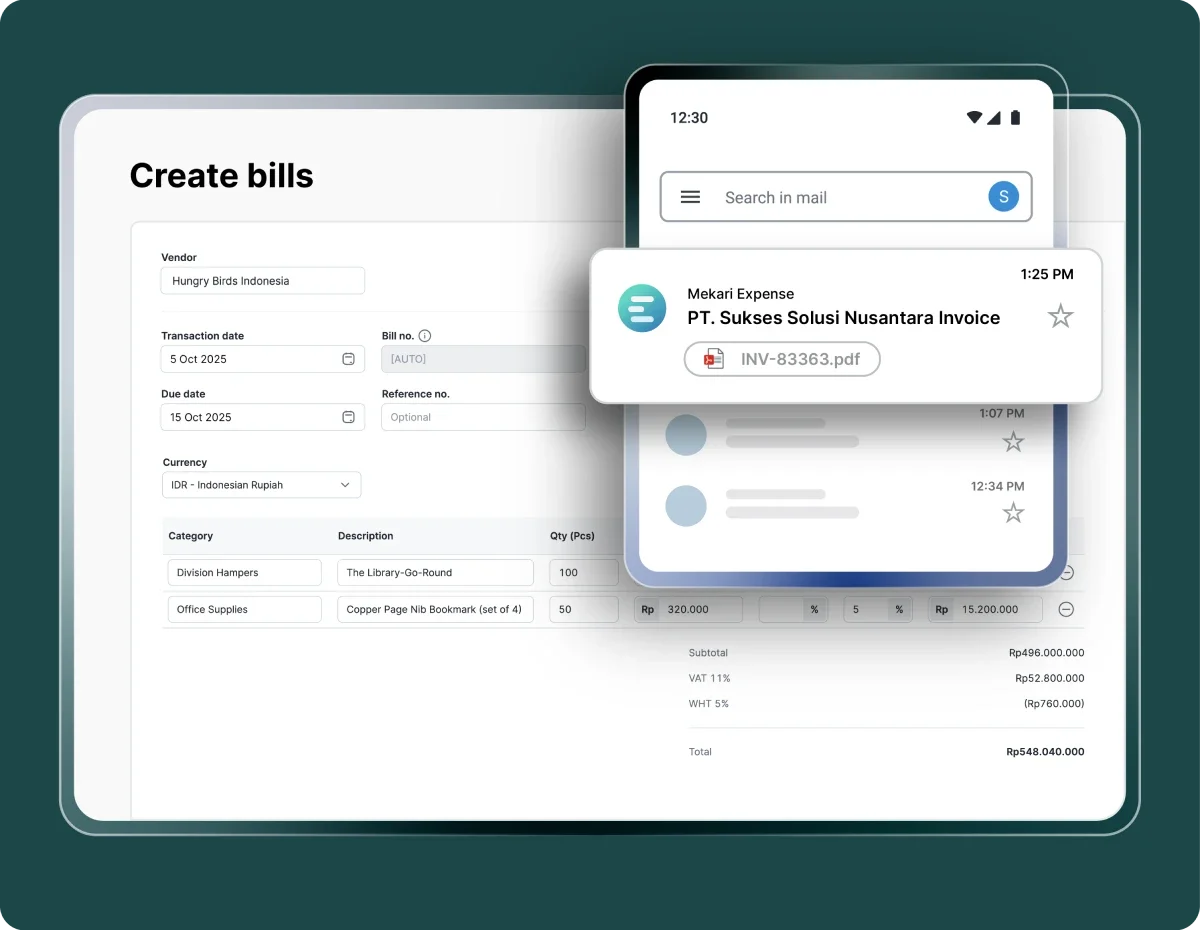
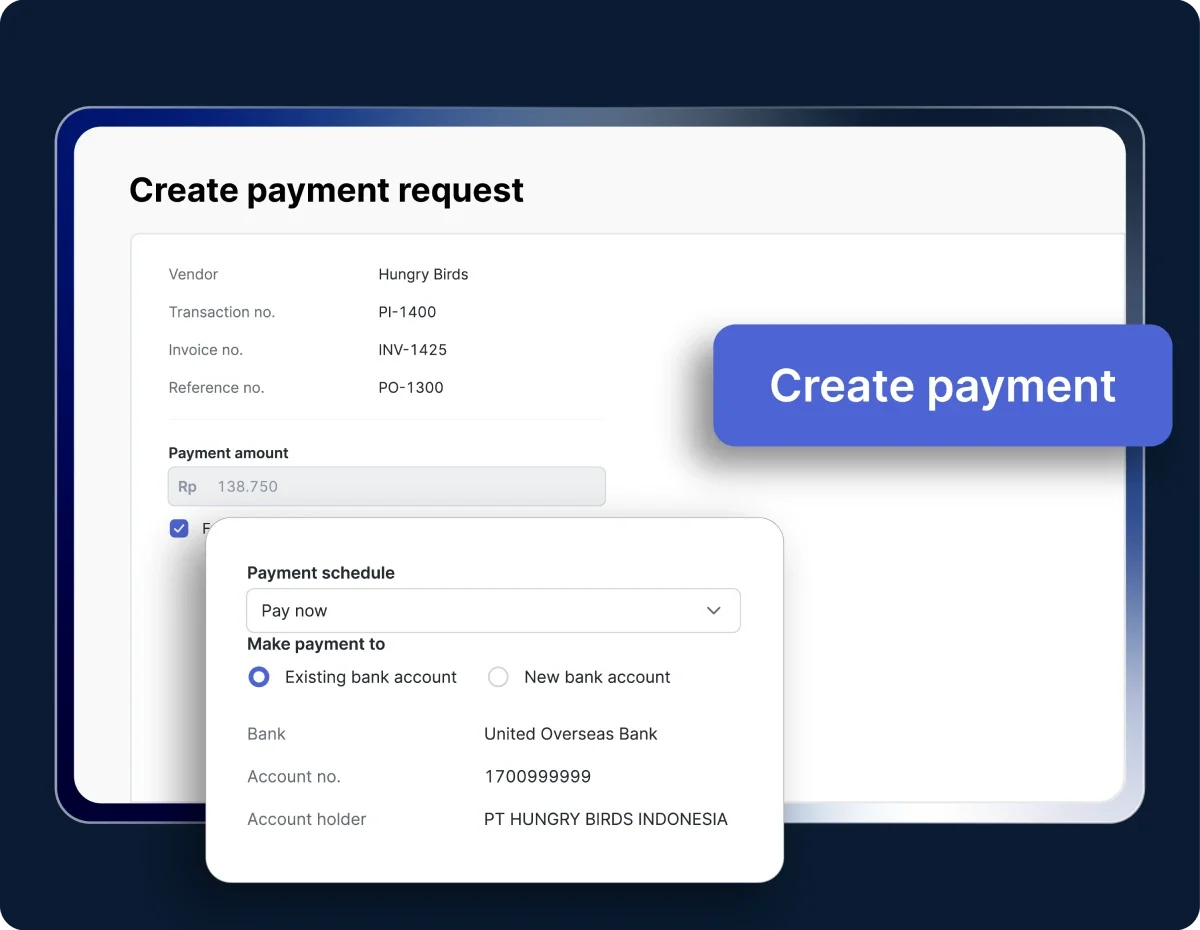
Mekari Expense is a spend management system that handles the full vendor invoice lifecycle through its Accounts Payable module, from invoice submission and approval to payment scheduling and accounting reconciliation. 

Unlike standalone invoicing tools, this invoice software connects purchase invoice management directly to spend controls, expense policies, and accounting records in one integrated platform โ€” maintaining a complete audit trail of every approval action for compliance and reconciliation.

Key features:

  • AI-powered OCR: Automatically captures and extracts invoice data from uploaded documents, reducing manual entry and input errors
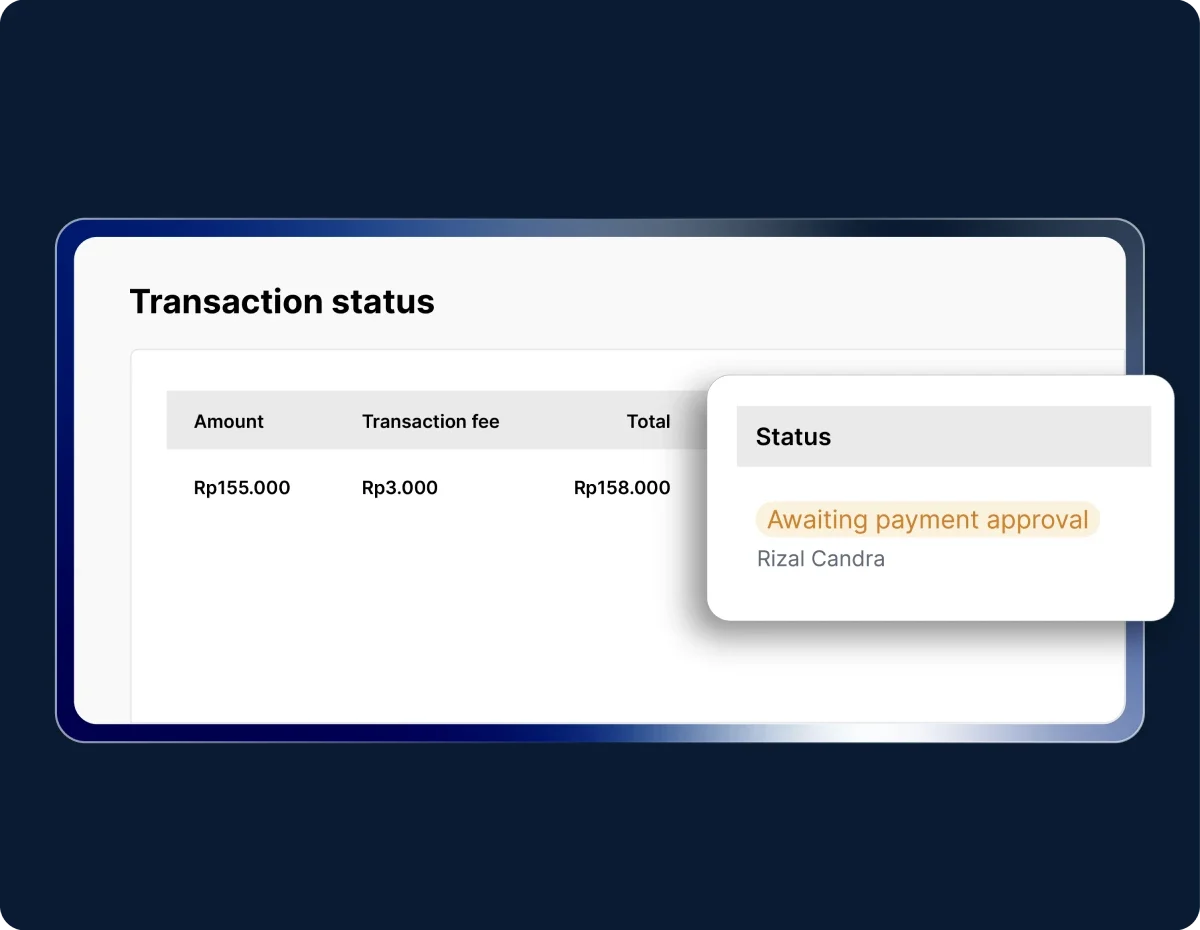
  • Multi-level approval workflow: Customizable approval routing by role, department, amount, or branch โ€” with automated notifications at each stage
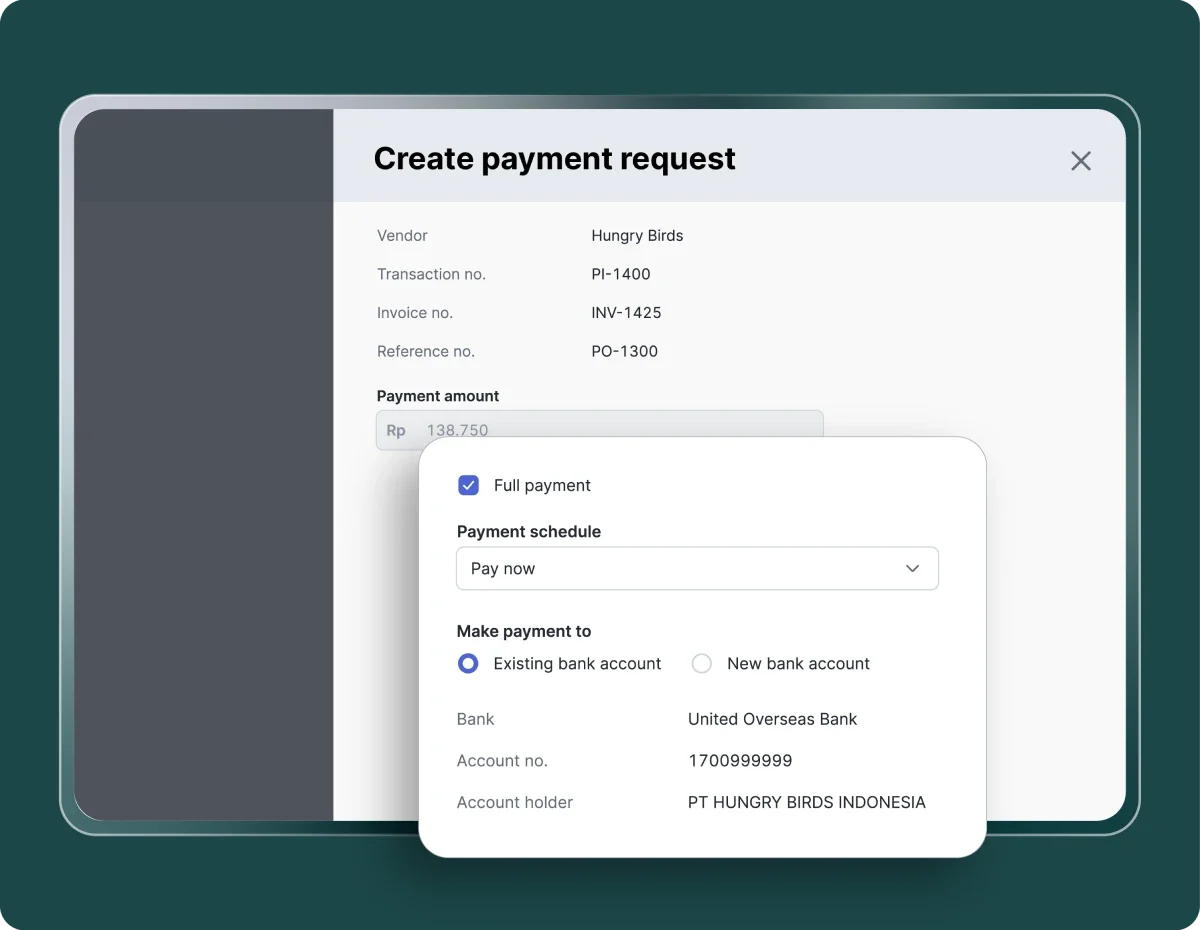
  • Flexible payment scheduling and recurring invoice payments: Automates vendor payment schedules โ€” immediately after approval, on the due date, or on a custom date โ€” including recurring invoice payments for repeat suppliers
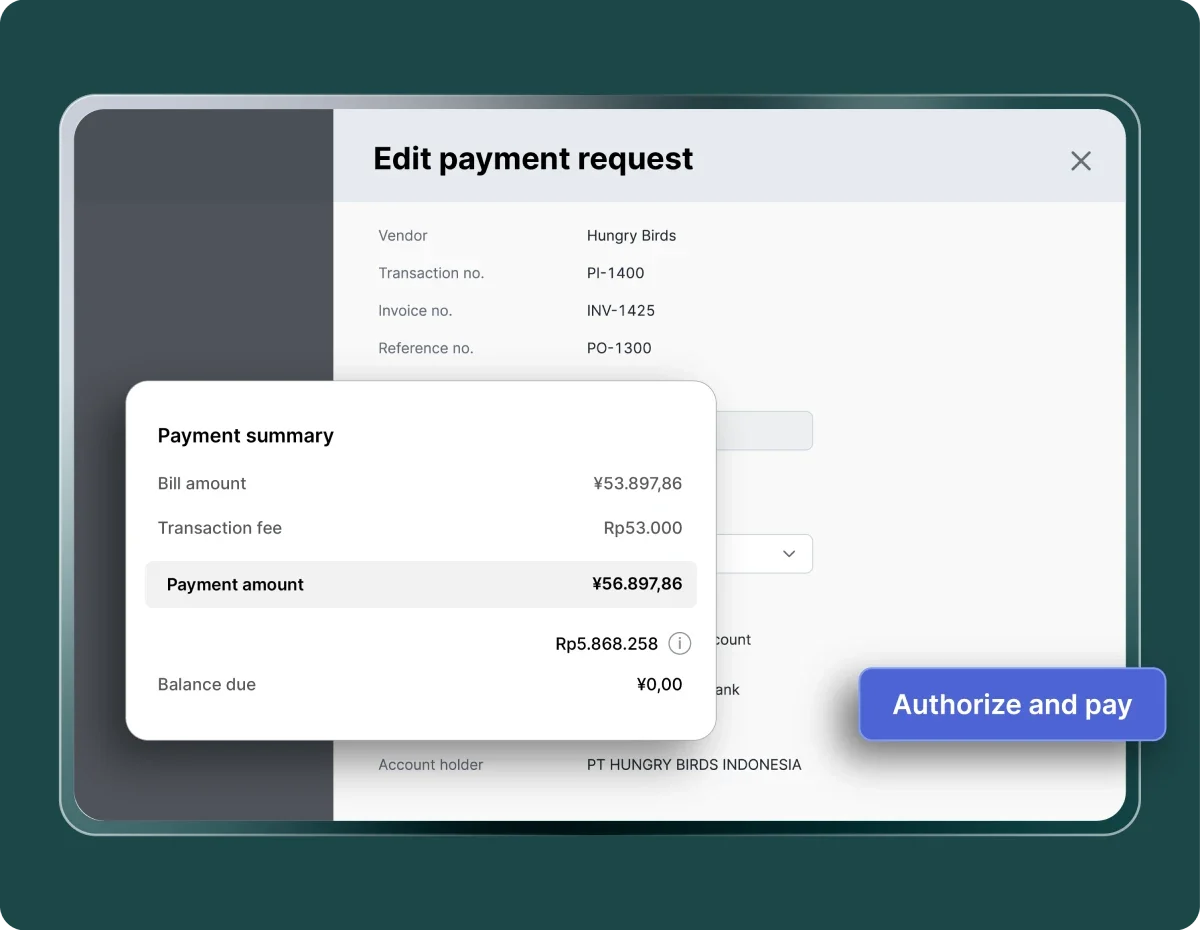
  • International remittance: Processes vendor payments to 40+ countries with real-time exchange rates
  • Vendor Portal: Centralizes vendor data, payment terms, and transaction history in one dashboard
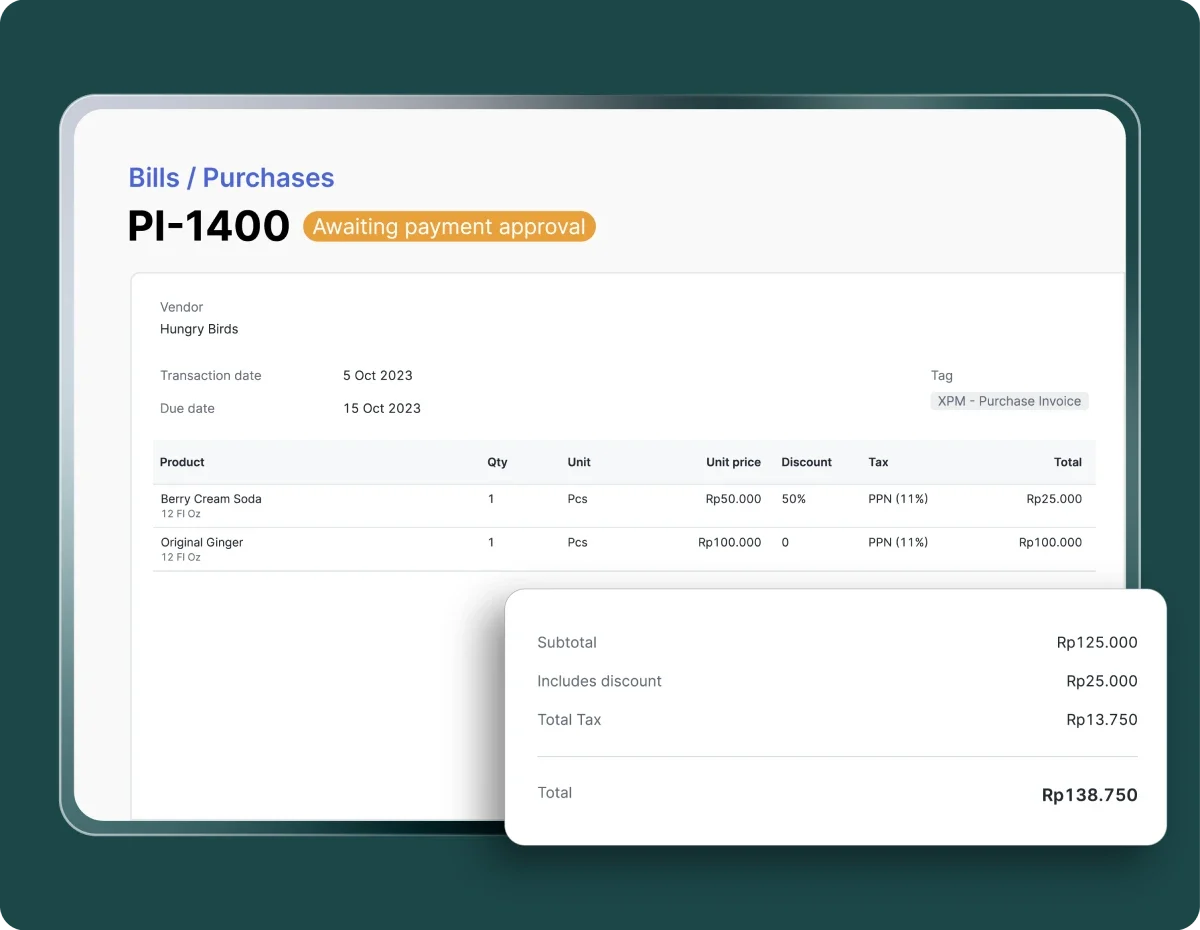
  • Real-time invoice tracking: Monitors invoice status โ€” submitted, under review, approved, paid โ€” with automated notifications throughout
  • Seamless integration: Auto-syncs with Mekari Jurnal, Mekari Talenta, and Mekari Klikpajak within Mekari’s unified software ecosystem, eliminating manual data transfer and keeping financial records consistent across systems.
  • Mobile app: Available on iOS (App Store with 4.8 rating) and Android (Play Store with 4.6 rating) for invoice management on the go.
  • Security and compliance: ISO 27001-certified with built-in tax compliance support and full audit trail across all approval and payment actions

Best for: SMBs to large enterprises managing a high volume of vendor invoices that need complete AP automation with built-in spend control, tax compliance, and accounting integration in a single system.

Pricing: See Mekari Expense pricing page for details.Mekari Expense also offers a free trial for you to explore its features and experience its advantages beforehand.

Baca Juga: 10 Best Inventory Invoice Software to Manage Stock and Billing

2. Spendesk

Spendesk Invoice Software

Spendesk is an AI-powered accounts payable and invoice software that automates the full vendor invoice lifecycle within a broader procure-to-pay system.ย 

This invoicing platform is built for SMBs and mid-market companies with 50โ€“1,000 employees that need invoice management, corporate cards, and expense tracking in one system.

Key features:

  • AI-powered OCR to automate invoice capture: Uses OCR to automatically extract invoice data and match it to existing records, reducing manual entry across the AP workflow
  • Customizable approval workflows: Supports dynamic approver roles and multi-condition routing to handle complex invoice approval processes
  • Real-time invoice tracking: Centralizes invoice status visibility โ€” from submission through approval to payment โ€” with automated notifications at each stage
  • Accounting integrations: Connects with Xero, NetSuite, Datev, and more for seamless invoice data sync

Best for: SMBs to mid-market companies (50โ€“1,000 employees) that need a unified procure-to-pay platform combining invoice management, corporate cards, and expense tracking in one system.

Pricing: Contact Spendesk for a custom quote.

Read More: Top 7 Procurement Automation Software to Streamline Procurement Cycle

3. MineralTree TotalAP

MineralTree TotalAP is a cloud-based invoice-to-pay automation solution that digitizes and automates the entire accounts payable workflow. 

This AP automation tool helps small to mid-market businesses eliminate manual AP work as invoice volumes scale.

Key features:

  • Automatic invoice capture: Captures and codes header and line-level invoice data automatically, eliminating manual data entry at scale
  • Flexible approval routing: Configures multiple approval tiers and routing logic based on invoice amount, vendor, department, or location
  • Multiple payment methods: Supports ACH, virtual card, and check payments based on vendor preferences, including international wire transfers at spot rates

Best for: Mid-market companies processing 100 to 10,000+ vendor payments per month that need scalable AP automation with payment optimization.

Pricing: Pricing is based on invoice and payment volume with no per-user fees. Contact MineralTree for a custom quote.

Read More: Top 6 Accounts Payable Software for Small Business Needs

4. Zahara

Zahara Invoice Software

Zahara is a cloud-based invoice and purchase management platform for small to mid-sized multi-site organizations that need structured invoice approval tied directly to departmental budget controls.

This invoicing solution covers the full AP cycle from purchase requests through invoice matching, approval, and payment.

Key features:

  • AI invoice processing: OCR-powered capture that processes invoices up to nine times faster than manual entry, with automatic PO matching.
  • Flexible approval workflows: Customizable routing for vendor invoices with role-based access controls and automatic budget escalation for over-spend requests.
  • Departmental and project budgets: Ring-fences spend by department or project so invoice approvals stay within pre-set financial limits.

Best for: Small to mid-sized businesses and multi-site organizations โ€” particularly in construction, hospitality, and non-profits โ€” that need structured invoice management tied directly to departmental budget controls.

Pricing: Team plan starts at $142/month for 10 users, and the business plan starts at $263/month for 18 users with higher volume limits. Custom pricing available for larger needs.

Read More: Best 10 Accounts Payable Software for Large Businesses in 2026

5. Melio

Melio Invoice Dashboard

Melio is a cloud-based accounts payable and invoice management platform built to simplify bill payments and vendor management for small businesses. 

This AP solution is best known for its free ACH bank transfer model, making it one of the most cost-accessible invoice software options for US-based SMBs.

Key features:

  • AI-powered invoice capture: Automatically extracts vendor details, amounts, line items, and due dates from emailed or uploaded invoices โ€” with minimal manual entry
  • Flexible payment methods: Supports free ACH transfers, same-day ACH, instant transfer, credit/debit card, paper check, and international payments in USD or local currencies
  • Approval workflows: Configures multi-level approvals by team member, role, or payment amount to maintain oversight before payments are processed

Best for: Small businesses and SMBs looking for a simple, low-cost AP solution to manage vendor invoices and bill payments without the complexity of a full-scale AP platform.

Pricing: Free plan available with free ACH transfers. Per-transaction fees apply for other payment methods (e.g., 2.9% for card payments, $1.50 per paper check). See Melio pricing page for current plan details.

6. QuickBooks Online

QuickBooks Online is the most widely adopted accounting platform for small businesses, with invoicing built directly on top of its accounting infrastructure. 

Every invoice sent syncs automatically with bookkeeping records, eliminating the reconciliation gap that appears when invoicing and accounting tools operate independently.

Key features:

  • Invoicing synced with accounting: Fully reconciled against bookkeeping, financial reporting, and tax records โ€” no manual data transfer required
  • Progress invoicing: Splits estimates into milestone-based payments for phased or project-based billing
  • Recurring invoices with automated payment reminders: Automates repeat billing and overdue follow-up notifications
  • Multiple payment methods: Accepts credit card, ACH bank transfer, Apple Pay, and PayPal
  • AI-powered invoice generation: Generates invoices and categorizes expenses automatically

Best for: Small businesses that need invoicing and accounting in a single, deeply integrated platform โ€” especially those with complex reporting, multi-user access, or tax compliance requirements.

Pricing: Starts at $38/month (Simple Start). No permanent free plan; promotional discounts frequently available.

7. Xero

Xero is a cloud-based accounting platform with invoicing capabilities and an integration library of 1,000+ third-party apps, making it one of the most connected billing software options available to small businesses.

Its invoicing module supports customizable invoice templates, automated payment reminders, recurring invoices, and multi-currency billing for businesses operating across borders.

Key features:

  • Customizable invoice templates: Branded layouts with payment terms, logo, and tax-compliant formatting
  • Multi-currency support: Handles exchange rates and foreign currency adjustments for international clients and vendors
  • Automated payment reminders and recurring invoices: Automates follow-ups for overdue invoices and repeat billing on a set schedule
  • 1,000+ integrations: Including GoCardless, Stripe, PayPal, and Gusto โ€” native connections without middleware
  • Real-time cash flow dashboard: Financial reporting and cash flow visibility alongside outstanding invoices

Best for: Growing small businesses with international clients or complex integration needs that want deep accounting functionality alongside invoicing.

Pricing: Starts at $20/month (Early plan, up to 20 invoices/month). No permanent free plan; 30-day free trial available.

8. Sage

Sage Invoice Dashboard

Sage is a cloud-based accounting and invoicing platform trusted by over 2 million small businesses globally.

This invoicing software covers the full billing workflow within a broader accounting suite, making it a strong fit for small to mid-sized businesses that want invoicing, expense tracking, cash flow management, and financial reporting in one place.

Key features:

  • Customizable invoice creation: Creates branded invoices from nine professional templates, with options for recurring invoices, pro-forma invoices, and direct quote-to-invoice conversion
  • Real-time invoice tracking: Monitors invoice status โ€” sent, viewed, paid, or overdue โ€” with automated payment reminders via integrated Stripe payments
  • Bank reconciliation and cash flow: Automatically imports bank transactions and reconciles accounts in real time, giving a live view of cash position alongside outstanding invoices
  • Multi-currency support: Handles exchange rates and foreign currency adjustments for businesses invoicing international clients, available on higher-tier plans

Best for: Small to mid-sized businesses that need invoicing tightly integrated with accounting, bank reconciliation, and financial reporting โ€” without managing separate tools for each function.

Pricing: Sage 50 starts at $124.42/month.

Free Invoice Software for Small Businesses and Freelancers

Not every small business needs a full AP automation platform from day one. Freelancers, solopreneurs, and very small teams often have straightforward billing needs: send professional invoices, collect payment online, and track what’s outstanding โ€” without a monthly subscription cutting into already thin margins.

The tools below offer genuinely free plans that cover these essentials. Each one handles the core invoice lifecycle โ€” creating and sending invoices, automating payment reminders, and collecting payment online โ€” at no recurring cost. Where they differ is in how far they extend beyond basic billing: some add time tracking and client portals, others bring banking integration or open-source flexibility.

Important notes for freelancers

If you bill clients for time, projects, or retainers โ€” rather than managing vendor invoices โ€” these tools fit that workflow better than the AP-focused options above. Zoho Invoice and Wave are the most commonly recommended free invoicing tools for freelancers. Mercury works well for startups and early-stage businesses collecting client payments. Invoice Ninja suits tech-forward freelancers who want self-hosting or payment gateway breadth. When your billing grows more complex โ€” particularly around time tracking and project billing โ€” FreshBooks (covered above) is the natural next step.

1. Zoho Invoice

Zoho Invoice is a permanently free cloud-based invoicing solution built for freelancers, solopreneurs, and small businesses that need professional invoicing without a monthly cost commitment. 

Despite carrying no subscription fee, it covers the full invoice lifecycle: customizable invoice templates, automated payment reminders, recurring invoices, expense tracking, and a self-service client portal โ€” with multi-currency support across 17 languages.

Key features:

  • Customizable invoice templates: 18+ layouts with logo, brand colors, custom fields, and tax-compliant formatting โ€” with estimates convertible directly into invoices
  • Automated payment reminders: Schedules and sends follow-up notifications automatically for overdue invoices
  • Recurring invoices: Automates repeat billing for ongoing clients at a set schedule
  • Client portal: Gives customers a self-service portal to view balances, approve quotes, pay invoices, and download statements
  • Time tracking: Logs hours against projects and converts timesheets into invoices automatically

Best for: Freelancers and small businesses that need a free, feature-rich invoicing tool with professional templates, automated reminders, and room to grow into the Zoho ecosystem.

Pricing: Free forever โ€” no subscription fees, no ads, no hidden costs. Supports up to 2 users, up to 500 invoices per year, and up to 3 active projects.

2. Wave

Wave Invoice Dashboard

Wave is a free cloud-based invoicing and accounting platform built for small businesses, freelancers, and solopreneurs who need professional invoicing without the cost of paid software. Unlike pure invoicing tools, 

This invoice software for small business combines invoice creation, online payment collection, and basic bookkeeping in one platform. Therefore income, expenses, and outstanding invoices all live in the same place without requiring a separate accounting tool.

Key features:

  • Unlimited invoice creation: Creates and sends unlimited customizable invoices with logo, brand colors, and payment terms on both Starter and Pro plans
  • Automated payment reminders: Sends follow-ups automatically for overdue invoices
  • Recurring invoices: Automates repeat billing for regular clients at a set schedule
  • Online payment collection: Accepts credit card, ACH bank transfer, and Apple Pay directly from invoices, with funds reconciled automatically

Best for: Freelancers, solopreneurs, and very small businesses with fewer than 10 employees that need a free, easy-to-use invoicing solution with basic accounting built in.

Pricing: Starter plan is free with unlimited invoicing. Pro plan is $16-19/month and adds auto-imported bank transactions, discounted processing rates, and receipt capture. Transaction fees apply (2.9% + $0.60 per credit card transaction on the Starter plan).

3. Mercury

Mercury is a fintech banking platform for early-stage startups and small businesses that includes built-in invoicing and accounts receivable tools as part of its broader financial operations suite. 

Unlike the AP-focused tools before this section, Mercury’s invoicing is oriented around collecting payments from clients and managing account receivables โ€” making it a better fit for businesses that need to send invoices and receive money, rather than manage and pay vendor bills.

Key features:

  • Invoice creation and tracking: Creates branded invoices with company logo and color scheme in minutes, with a real-time dashboard showing what’s pending, paid, or overdue across all invoices
  • Multiple payment methods: Customers can pay via credit card, Apple Pay, Google Pay, ACH transfer, wire, or ACH debit โ€” with incoming payments automatically matched to the corresponding invoice
  • Accounting integrations: Syncs invoice payments with QuickBooks, Xero, and NetSuite automatically, reducing manual reconciliation
  • Recurring invoices: Automates repeat billing at a chosen frequency, available on paid plans starting at $29.90/month

Best for: Early-stage startups and small businesses that want a simple, banking-integrated invoicing tool to send invoices and collect client payments without managing a separate accounts receivable platform.

Pricing: Basic invoicing is free with a Mercury account. Recurring invoices, ACH debit, and invoicing API access are available on Mercury Plus ($29.90/month) and Mercury Pro ($299/month).

4. Invoice Ninja

Invoice Ninja is an open-source invoicing platform that gives small businesses and freelancers full control over their billing workflow โ€” including the option to self-host the software for complete data ownership, with no vendor dependency. 

This invoicing platform offers a free cloud plan that supports up to 20 clients with unlimited invoices and quotes, with 40+ payment gateway integrations and built-in time tracking that most free invoicing tools cannot match.

Key features:

  • Self-hosting option: Full data ownership with no vendor lock-in โ€” deploy on your own server or use the cloud version.
  • 40+ payment gateway integrations: Including Stripe, PayPal, and Square.
  • Time tracking and project billing: Logs billable hours against projects and converts timesheets into invoices automatically.
  • Recurring invoices and automated payment reminders: Automates repeat billing and overdue follow-ups on a set schedule.
  • E-invoicing via PEPPOL: Available on the Enterprise plan for compliance with European e-invoicing standards.

Best for: Tech-forward freelancers and small teams who want open-source flexibility, self-hosting capability, or payment gateway breadth that free SaaS tools cannot offer.

Pricing: Free plan โ€” up to 20 clients, unlimited invoices, single user. Pro plan from $10/month for unlimited clients, custom branding, and advanced reporting.

5. FreshBooks

FreshBooks is a cloud-based invoicing and accounting platform built for service-based businesses, agencies, and freelancers that bill by the hour or by project. Its invoicing module connects directly to built-in time tracking, so billable hours flow automatically into invoices without manual entry.

Key features:

  • Time tracking: Integrated directly with project billing and invoice creation โ€” billable hours flow into invoices automatically
  • Recurring invoices with automated payment reminders: Automates repeat billing and follow-up notifications for overdue invoices
  • Client portal: Customers can view invoice history, approve estimates, and pay directly online
  • Expense tracking: Mobile receipt capture on iOS and Android with accounting integrations including QuickBooks and Gusto

Best for: Freelancers and service-based small businesses that bill by time or project and need invoicing tightly connected to project and expense tracking.

Pricing: Starts at $8.40/month (Lite plan, up to 5 active clients). No permanent free plan; 30-day free trial available.

Key Features to Look For in Invoice Software for Small Businesses

Comparing invoicing software is easier when you know what to look for. The list above covers a range of options, but the right choice depends on which features align with how your business actually processes invoices. 

Here are the key capabilities worth evaluating before you decide which invoice software is the best choice for small business:

  • Automated and flexible invoice creation, including OCR: The best tools let you create invoices manually, upload them via PDF, or capture data automatically using AI-powered OCR โ€” extracting vendor details, line items, amounts, and due dates without manual entry.
  • Multiple payment methods: Look for software that supports ACH/bank transfer, credit and debit card, digital wallets, and paper check. The wider the payment options, the fewer barriers between you and getting paid.
  • International remittance for overseas vendors: If your business works with overseas suppliers or contractors, you need a platform that supports cross-border payments in multiple currencies with transparent exchange rates and competitive fees.
  • Recurring invoice and auto-billing capability: For businesses with repeat clients or ongoing vendor relationships, the ability to automate billing on a set schedule to eliminate manual work and reduce missed payment cycles.
  • Automated and flexible approval workflows: Enterprise-grade invoice software allows you to configure multi-level approval routing by role, department, invoice amount, or vendor.
  • Real-time invoice tracking with automated payment reminders: You should be able to see exactly where every invoice stands โ€” submitted, under review, approved, or paid โ€” with automated follow-ups triggered for overdue invoices.
  • Vendor management: A centralized vendor portal or directory where you can store payment details, track transaction history, manage payment terms, and communicate with suppliers in one place.
  • ERP and accounting software integration: Invoice software that syncs bidirectionally with your accounting or ERP system eliminates manual data entry and keeps financial records consistent across tools.
  • Mobile app access for invoicing on the go: Whether you’re approving payments off-site or capturing a vendor invoice in the field, a reliable mobile app ensures your AP workflow isn’t tied to a desk.
  • Security and compliance: Look for platforms with ISO 27001 certification, PCI-DSS compliance, two-factor authentication, and audit trails โ€” particularly important for businesses handling high payment volumes or managing sensitive vendor data.

The right combination of these features is what separates invoice software that just sends bills from one that actually improves how your business manages vendor relationships and cash flow.

Read more: 10 Best Contractor Invoice Software: Features & Benefits

How to Choose Invoice Software for Your Small Business

Finding the right invoice software comes down to matching the tool to how your business actually operates. Before committing to any platform, run through these criteria:

  • Business needs: Do you need invoice software to manage what you owe, or what you’re owed? Accounts payable tools โ€” like Mekari Expense, Spendesk, or Xero โ€” are built for businesses that receive vendor bills and need to route them through approvals before payment. Accounts receivable tools โ€” like Wave, Zoho Invoice, and FreshBooks โ€” are built for businesses that send invoices to clients and need to collect payment. Some platforms cover both; most are optimized for one side of the billing cycle.
  • Invoice volume: How many invoices does your team process per month? Free tools cap out quickly; high-volume operations need automation to stay accurate.
  • Accounting integration: Does the software sync with your existing accounting stack (QuickBooks, Xero, Jurnal)? Manual reconciliation between disconnected tools creates errors and delays.
  • Approval workflow complexity: Do invoices need multi-level sign-off before payment? Basic tools route straight to payment; AP-focused platforms let you configure approval chains by department, amount, or vendor.
  • Free plan vs. paid: Free tiers work for freelancers or micro-businesses with low invoice volume. Growing businesses typically need automation, reporting, and integrations that only paid plans offer.
  • Mobile access: If your team submits or approves invoices on the go, check whether the platform has a functional mobile app โ€” not just a responsive website.
  • Multi-currency support: Businesses paying overseas vendors need real-time FX rates and cross-border payment support built into the invoicing flow.
  • Scalability: Can the platform handle more users, higher invoice volumes, and additional workflows without requiring a system migration six months from now?

The Best Invoice Software for Small and Medium Businesses

Most invoice software on this list does the basics well โ€” uploading invoices, routing approvals, and processing vendor payments. The problem is that invoice data often ends up siloed, disconnected from expense reports, budget allocations, and accounting records that live in separate tools.

Mekari Expense solves this as a unified spend management system with Purchase Invoice feature that can serve as invoice software for small business.

Unlike standalone invoice tools, this invoicing software connects purchase invoice management directly to budget controls, expense policies, and accounting reconciliation in one platform.

Key advantages that set Mekari Expense apart from other invoicing solutions:

  • Controlled cash flow: Faster invoice processing helps maintain liquidity and ensures payments are made on time โ€” reducing the risk of late payment penalties and strained vendor relationships
  • High efficiency: Digitizing the entire invoice workflow reduces the administrative burden on finance teams, eliminating manual data entry and saving hours of work each month
  • Centralized data: Every invoice status, payment value, and proof of transfer is recorded in one platform, making financial reporting and auditing significantly more accurate
  • Stronger vendor relationships: On-time, transparent payments build supplier trust and open the door to better payment terms and long-term partnership
  • Guaranteed compliance: Every invoice is automatically verified against internal spending policies and applicable tax regulations, including VAT and withholding tax calculations
  • Integrated with Mekari’s unified software ecosystem: Payment data connects and reconciles automatically with Mekari Jurnal, keeping accounting records consistent without manual intervention

Ready to simplify your vendor invoice process? Start with Mekari Expense’s Purchase Invoice right now!

FAQ

1. How do I know if my business is ready to switch from spreadsheets to invoice software?

1. How do I know if my business is ready to switch from spreadsheets to invoice software?

If your team is manually entering invoice data, struggling to track which clients have paid, or losing visibility over vendor bills and payment due dates, your business has outgrown spreadsheets. Invoice software becomes especially valuable once your billing volume โ€” whether that’s invoices you send to clients or bills you receive from vendors โ€” exceeds what one person can reliably manage without errors.

2. How do I choose the right invoice software for my small business?

2. How do I choose the right invoice software for my small business?

Start by mapping your invoice volume, approval complexity, and how tightly the tool needs to connect to your accounting system. A freelancer sending 10 invoices a month has different needs than an SMB managing 200+ vendor invoices with multi-department approvals.

3. Is invoice software the same as accounting software?

3. Is invoice software the same as accounting software?

No โ€” accounting software records what has already happened financially, while invoice software manages the invoice process as it happens, from submission and approval to payment and reconciliation. Some platforms combine both, but dedicated invoice software goes deeper on workflow automation and AP management.

4. How is vendor invoice software different from invoicing software for customers?

4. How is vendor invoice software different from invoicing software for customers?

Vendor invoice software (accounts payable) manages invoices you receive from suppliers โ€” handling approvals, payment scheduling, and reconciliation. Customer invoicing software (accounts receivable) manages invoices you send to clients to collect payment. Some tools handle both, but most specialize in one direction.

5. How does Mekari Expense support invoice management for small businesses?

5. How does Mekari Expense support invoice management for small businesses?

Mekari Expense handles the full vendor invoice lifecycle โ€” from AI-powered OCR capture and multi-level approval routing to flexible payment scheduling and automatic reconciliation with Mekari Jurnal โ€” all within one integrated spend management system.

WhatsApp Icon WhatsApp sales