

10 mins read

10 Best Inventory Invoice Software to Manage Stock and Billing

mekari expense invoice and inventory featured image

Mekari Insight

  • Running invoicing and inventory separately creates data gaps that lead to errors, delays, and lost revenue. Manual processes increase the risk of invoice discrepancies and inaccurate stock records
  • Real-time synchronization helps prevent overselling, stockouts, and billing mistakes. Faster invoicing directly impacts cash flow by shortening payment cycles
  • Integrated systems provide better visibility for decision-making across finance and operations
  • Mekari Expense spend management system take this further by combining purchase invoices and product management into one connected systemโ€”helping businesses control spend while maintaining accurate financial and inventory data.

Managing invoices and inventory separately might work when your business is still small, but as transactions grow, the cracks start to show. 

Manual updates, mismatched records, and delayed visibility make it harder to track whatโ€™s sold, whatโ€™s in stock, and whatโ€™s actually getting paid.

Thatโ€™s why more businesses are shifting toward invoice and inventory software, an integrated system that connects billing and stock in one place, so every transaction is accurate, visible, and easy to manage from end to end.

What is invoice and inventory software?

Invoice and inventory software is an integrated system that connects billing and stock management in one platform. Every time a sale happens, the system automatically generates an invoice and updates inventory levels in real time, eliminating manual work and reducing the risk of data mismatches.

To understand how it works, it helps to break it into two core functions:

  • Invoicing: Create and send invoices, track payment status, automate reminders, and manage accounts receivable
  • Inventory management: Monitor stock levels in real time, track product movement, set low-stock alerts, and manage reorder points

When these functions are handled in separate tools, or spreadsheets, the gap between them often leads to errors, delays, and missed revenue opportunities. Bringing them into a single system improves accuracy, speeds up operations, and gives better visibility into both cash flow and stock.

This type of software is ideal for businesses that deal with physical products, including:

  • Retailers and e-commerce businesses
  • Wholesalers and distributors
  • Importers and manufacturers
  • Food and beverage operators
  • Tradespeople selling parts or materials alongside services

Why running invoicing and inventory separately doesn’t work

In a product-based business, every invoice is more than just a bill, itโ€™s a record of how products, payments, and stock move through the company. But when invoicing and inventory are managed in separate systems, the disconnect quickly turns into real operational and financial problems.

Hereโ€™s how those problems show up in practice, backed by real data:

  • Up to 39% of invoices contain errors, leading to payment delays, financial losses, and strained vendor relationships (finfloh.com)
  • Invoice errors can increase processing costs by up to 20%, as teams spend extra time correcting mistakes and reworking transactions (Resolve Pay)
  • Manual invoice processing costs $8โ€“$20 per invoice, highlighting how inefficient disconnected workflows can be at scale (Resolve Pay)

On the inventory side, the impact is just as serious:

  • Up to 60% of inventory records are inaccurate in retail environments, often due to manual processes and system gaps (altavantconsulting.com)
  • Inventory discrepancies, mismatches between recorded and actual stock, lead to stockouts, overstocking, and lost sales (NetSuite)
  • In retail, inventory inaccuracies can cost businesses around 4% of annual sales, directly impacting revenue (arXiv)

The downstream impact goes beyond operational inefficiency:

  • Delayed payments and cash flow issues: Invoice errors slow down collections and approvals

  • Lost revenue opportunities: Stock inaccuracies lead to overselling or missed sales
  • Poor decision-making: Without a unified view, businesses rely on incomplete data for pricing, purchasing, and forecasting

Ultimately, running invoicing and inventory separately creates constant data misalignment. These small gaps, between invoices, stock, and real operations, compound over time into higher costs, lost revenue, and weaker customer trust.

Benefits of invoice and inventory software

Connecting invoicing and inventory isnโ€™t just about keeping data aligned, it directly improves how your business operates, sells, and grows.

Hereโ€™s what that looks like in practice:

  • Fewer stockouts and oversells: Real-time synchronization ensures stock levels are always accurate across all sales channels. This prevents situations where the same item is sold twice or shown as available when itโ€™s already out of stock, reducing cancellations, refunds, and lost trust
  • Faster billing and shorter payment cycles: Invoices can be generated instantly from live inventory data and sent right away, even from the field. This shortens the gap between completing a sale and getting paid, while automated reminders help prevent overdue invoices
  • Better cash flow visibility: With real-time dashboards showing outstanding invoices, stock value, and upcoming purchase needs, businesses get a clear, up-to-date view of their financial position, not just at the end of the month
  • Fewer billing errors and disputes: When invoices are generated directly from verified inventory data, mistakes like incorrect pricing, wrong SKUs, or missing items drop significantly. This leads to fewer disputes, fewer revisions, and faster payments
  • Time saved on administration: Manual reconciliation between separate systems takes time and creates room for error. Automation removes repetitive tasks, allowing teams to focus on higher-value work instead of fixing data mismatches
  • Scalability without adding headcount: What works for a small operation quickly breaks down at scale. Integrated software can handle growing product lines and transaction volumes without requiring proportional increases in admin staff
  • Compliance and audit readiness: Every transaction, stock movement, and invoice is recorded in a single system with clear timestamps. This makes tax reporting, audits, and financial tracking much easier and more reliable

Top invoice and inventory software options

Choosing the right invoice and inventory software depends on how many products you manage, how complex your operations are, and whether you sell across multiple channels. 

Below are some of the top tools, each designed for different business needs.

1. Mekari Expense 

Mekari Expense is a spend management system that brings together purchase invoices, product management, procurement, and payments into one unified platform. 

Instead of managing invoices and product data in separate tools, everything is connected, ensuring accurate financial records and real-time visibility across your operations.

Purchase invoice automation

purchase invoice mekari expense
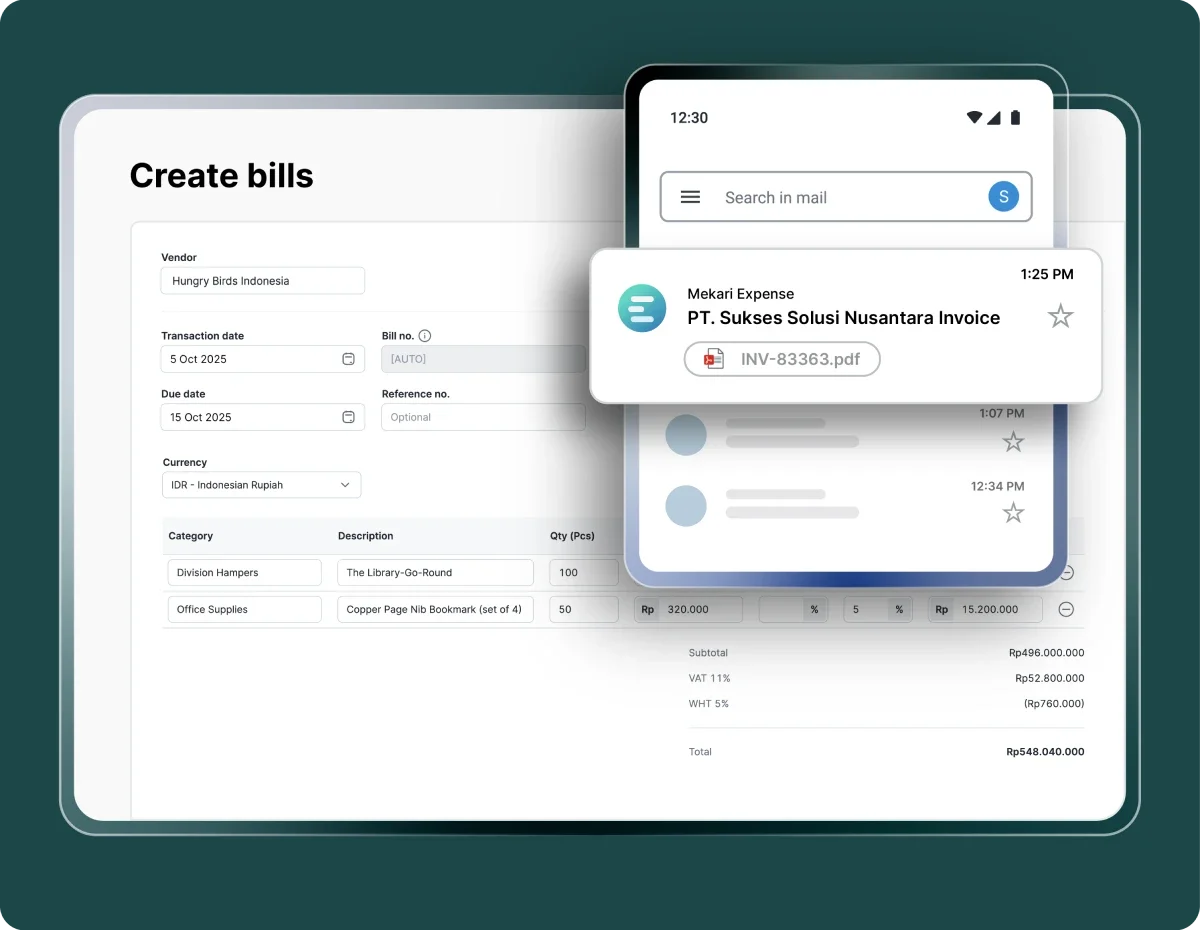
  • Automatic invoice input: Upload invoices manually or use OCR to extract data automatically from vendor files or emails, reducing manual entry and errors
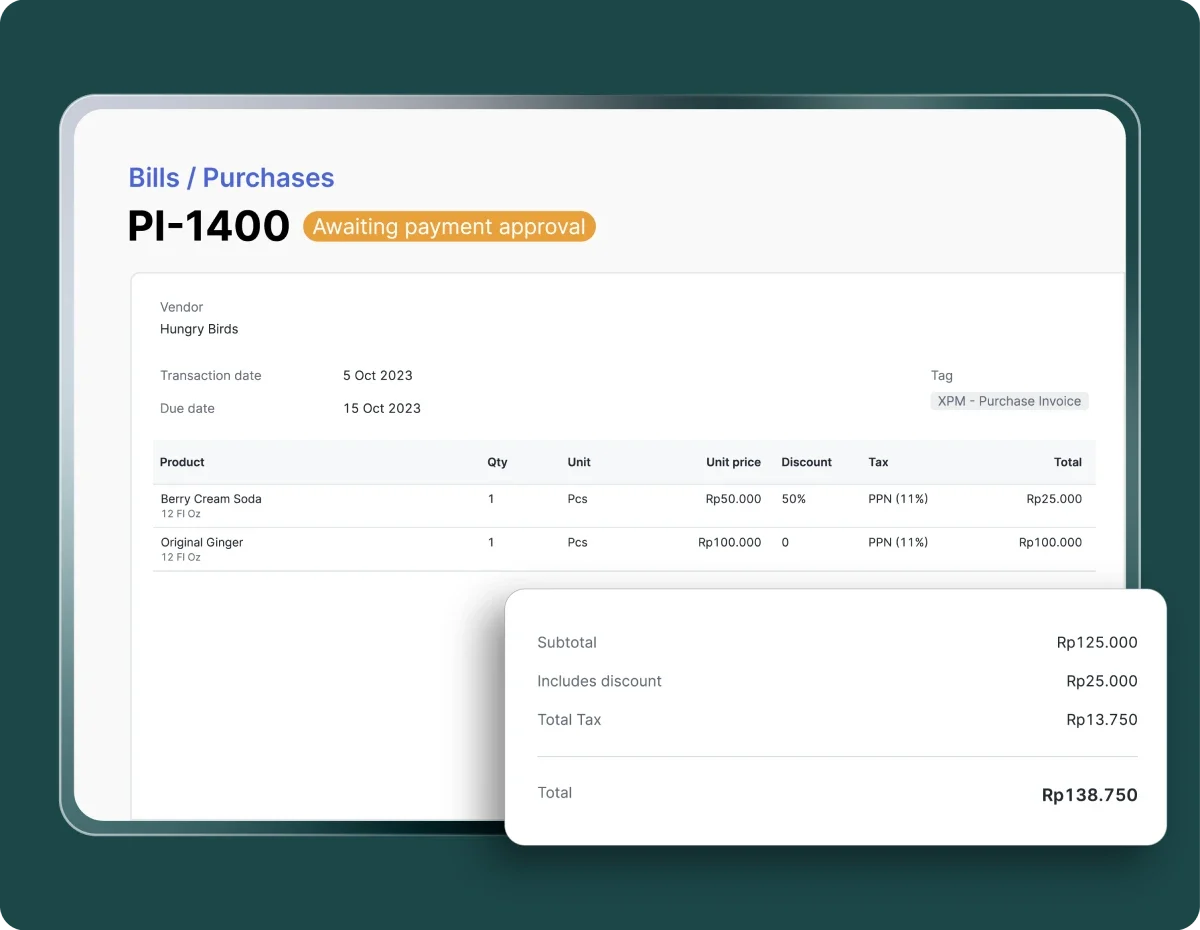
  • Structured invoice creation: Easily create invoices with complete details such as vendor, date, category, and total amount in a clean, intuitive interface
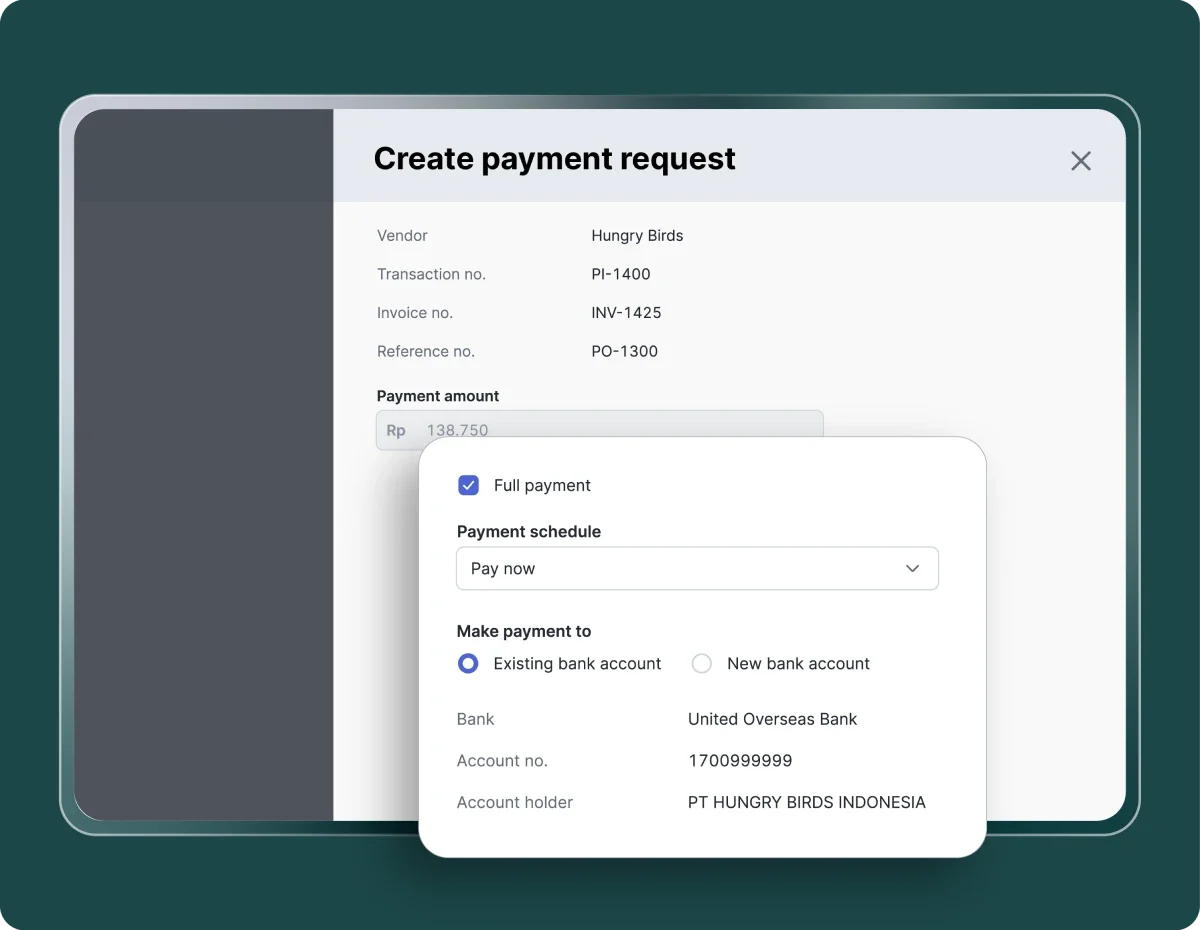
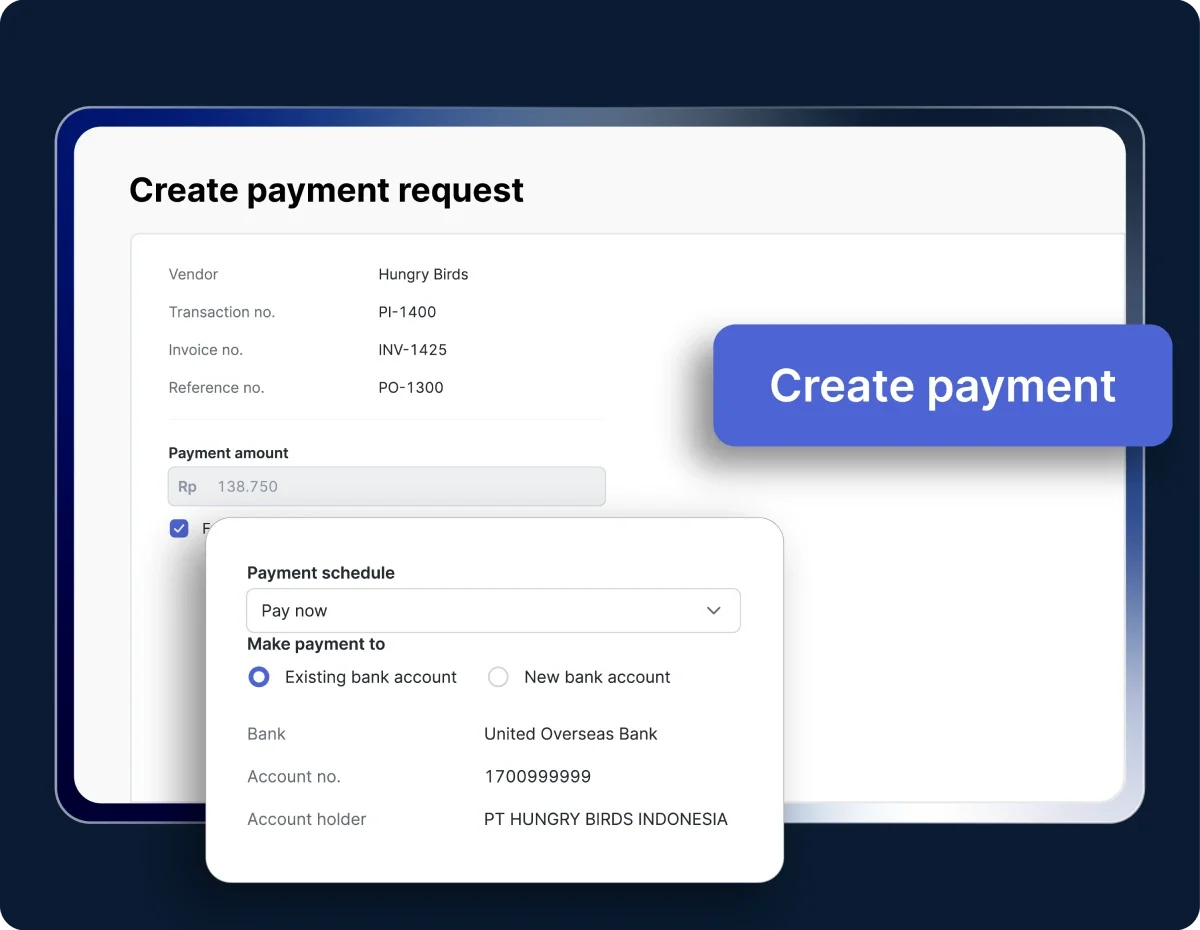
  • Payment scheduling: Set payments to be processed immediately after approval, on due dates, or on custom schedules based on your cash flow strategy
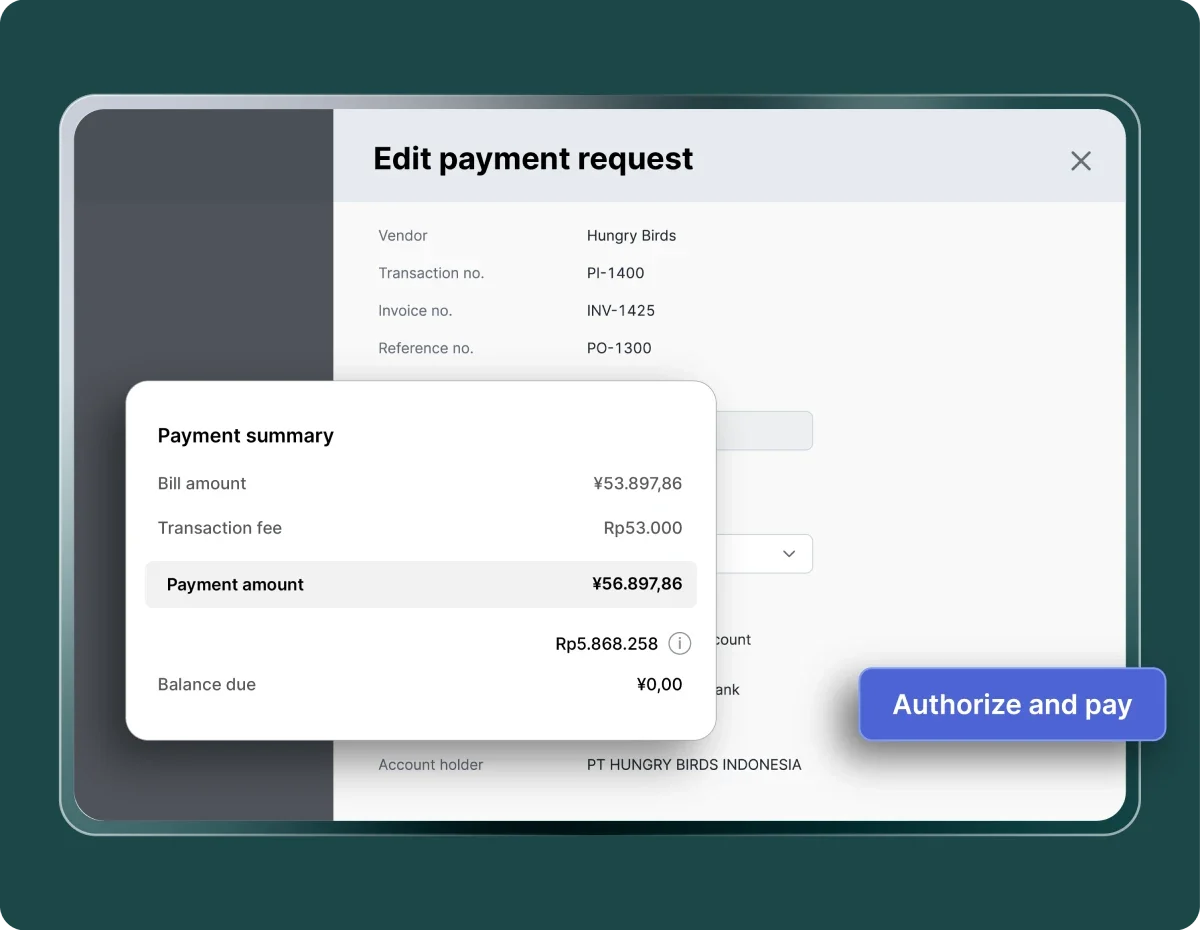
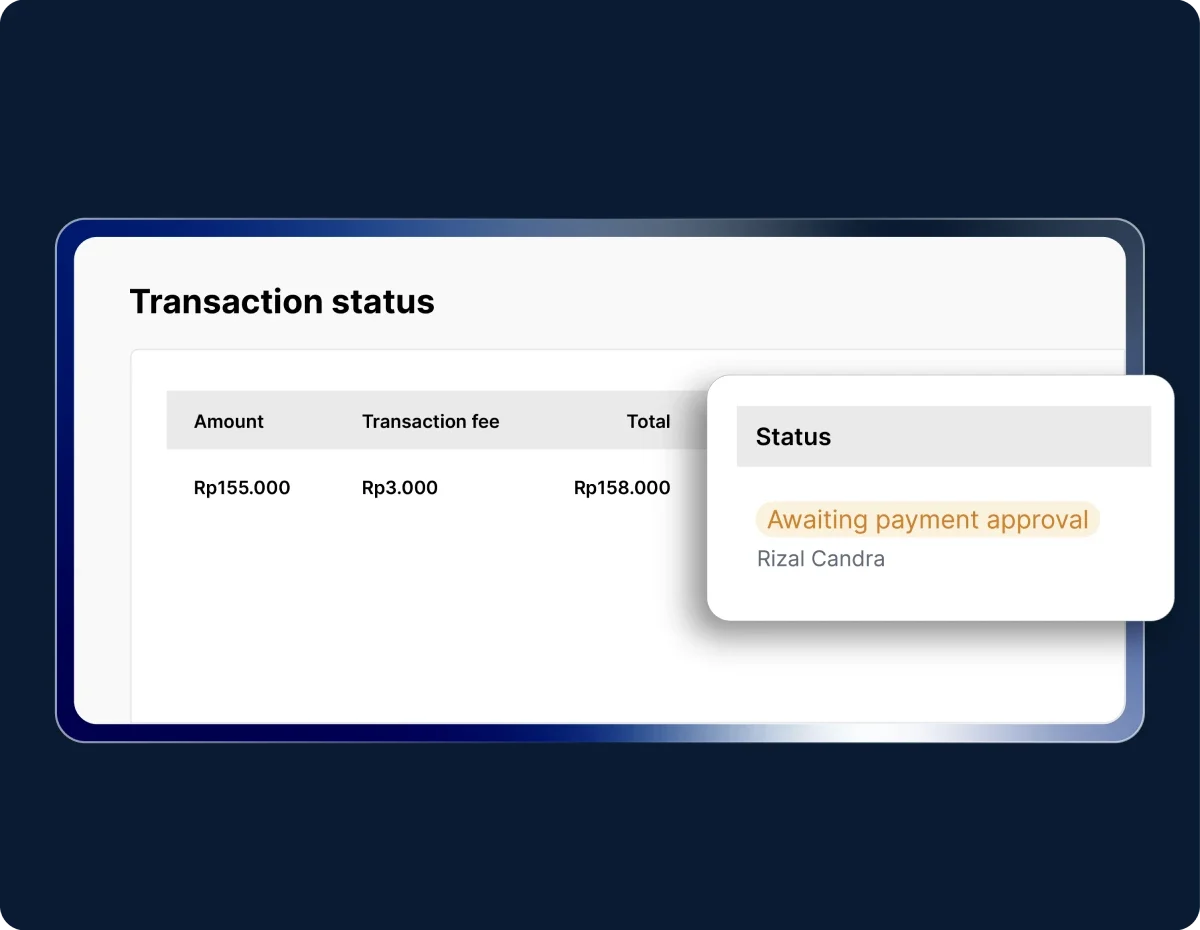
  • In-platform payments: Pay vendors directly from the system with built-in payment tracking, receipts, and foreign currency support
  • Automated tax calculation: Instantly calculate total invoice value, including VAT (PPN) and withholding tax (PPh), aligned with Indonesian regulations

Product management system

mekari expense product management system
  • Centralized catalog: Maintain a single product database accessible by all teams to prevent duplication and inconsistent data
  • SKU control: Standardize product identification with official SKUs to ensure consistency across purchasing and inventory processes
  • Purchase order integration: Product data is automatically pulled into purchase orders, speeding up workflows and minimizing manual errors
  • Real-time updates: Any changes to product data are instantly synchronized across the system, ensuring all teams work with the latest information

Why it stands out: Mekari Expense is not just an invoicing or inventory tool, itโ€™s a full spend management solution that connects purchasing, invoicing, product data, and payments in one ecosystem. 

This makes it especially valuable for businesses that want tighter control over spending, better accuracy in financial records, and scalable operations without adding complexity.

Read more: 9 Best Invoice Software for Small Business in 2026 to Reduce Errors 59%

2. Vencru

vencru

Vencru is a simple business management tool that combines invoicing, inventory tracking, and basic accounting features in one platform. It is designed for small businesses that want an all-in-one solution without complexity.

Key features:

  • Invoice creation and payment tracking
  • Basic inventory tracking with stock updates
  • Sales and expense recording
  • Low stock alerts for inventory control
  • Mobile-friendly interface for on-the-go management

Best for: Small retailers and solo operators who need simple invoicing and inventory in one tool

Read more: Top 9 OCR Invoice Scanning Software: Cut Costs by 78%

3. Invoice2go

invoice2go

Invoice2go is a mobile-first invoicing solution with basic inventory capabilities, designed for businesses that prioritize speed and flexibility in billing.

Key features:

  • Quick invoice creation from mobile devices
  • Product and service listing for basic inventory tracking
  • Payment tracking and notifications
  • Customer management and job tracking
  • Online payment integration

Best for: Small teams that need fast invoicing with light inventory tracking

4. Wave (with inventory add-ons)

wave

Wave is a free accounting and invoicing platform that can be extended with inventory add-ons to support basic stock management.

Key features:

  • Free invoicing and accounting tools
  • Invoice customization and recurring billing
  • Expense tracking and financial reporting
  • Integration with third-party inventory tools
  • Payment processing integration

Best for: Very small businesses looking for a budget-friendly invoicing solution with add-on inventory features

5. Xero

Xero is a cloud accounting platform that includes built-in inventory and invoicing capabilities, offering a more complete financial management system.

Key features:

  • Invoice creation with automated workflows
  • Inventory tracking with real-time stock updates
  • Support for thousands of inventory items
  • Bill management and cash flow tracking
  • Bank reconciliation and financial reporting

Best for: Growing businesses managing multiple products and needing integrated accounting

6. Zoho Inventory

Zoho Inventory is a dedicated inventory management system with strong invoicing capabilities, designed to streamline order and stock management.

Key features:

  • Order and invoice management in one system
  • Real-time inventory tracking across locations
  • Warehouse management and stock transfers
  • Integration with e-commerce platforms
  • Automated workflows for order fulfillment

Best for: Small to mid-sized businesses with multiple products and sales channels

7. FreshBooks

FreshBooks is primarily an invoicing and accounting tool that includes basic inventory tracking through expense and item management features.

Key features:

  • Professional invoice creation and automation
  • Expense and item tracking for simple inventory needs
  • Time tracking and project-based billing
  • Payment reminders and recurring invoices
  • Financial reporting and insights

Best for: Service-based businesses with light inventory needs

8. inFlow Inventory

inFlow Inventory is a purpose-built inventory management system with invoicing features, designed for product-based businesses with higher volume.

Key features:

  • Advanced inventory tracking with barcode support
  • Multi-warehouse management
  • Purchase order and supplier management
  • Sales order and invoicing integration
  • Reporting on stock levels and movement

Best for: Wholesalers and distributors managing large inventories

Read more: 10 Best Contractor Invoice Software: Features & Benefits

9. Cin7

Cin7 is a cloud-based inventory platform designed for businesses selling across multiple channels, combining inventory, POS, and invoicing.

Key features:

  • Multi-channel inventory synchronization
  • Barcode scanning and warehouse management
  • Built-in POS and invoicing
  • Integration with e-commerce platforms
  • Demand planning and stock forecasting

Best for: Multi-location retailers and omnichannel businesses

10. Unleashed Software

Unleashed is an inventory management solution focused on product-based businesses that need deeper stock control and reporting.

Key features:

  • Real-time inventory tracking and valuation
  • Batch and serial number tracking
  • Purchase and sales order management
  • Integration with accounting software
  • Advanced inventory reporting and analytics

Best for: Distributors and wholesalers needing detailed inventory control

From disconnected workflows to smarter invoice and inventory software

Managing invoicing and inventory separately may work at first, but it quickly leads to data mismatches, delayed payments, and poor visibility. Invoice and inventory software solves this by connecting both processes in real timeโ€”helping businesses stay accurate, efficient, and scalable.

Mekari Expense takes this further by combining purchase invoices and product management in one platform, with key advantages:

  • Consistent data & price control: One source of truth for products, SKUs, and pricing
  • End-to-end integration: Seamlessly connected with procurement and finance workflows
  • Real-time updates: All changes sync instantly across teams and branches
  • Faster processes: Quicker PO creation, invoicing, and payment execution
  • Better cash flow & efficiency: Faster billing, less admin work, and improved liquidity
  • Stronger compliance & reporting: Automated tax handling and seamless sync with Mekari Jurnal

With the right invoice and inventory software in place, businesses can move from fragmented processes to full operational and financial controlโ€”without added complexity.

References

HandiFox. “How Invoice Management Software Helps Small Inventory-Centric Businesses Thrive in 2025”
Straits Research. “Billing and Invoicing Software Market Size, Share & Growth”
Stripe. “Accounting and Inventory Management Software: A Guide”

FAQ

1. What is invoice and inventory software?

1. What is invoice and inventory software?

Invoice and inventory software is a system that combines billing and stock management in one platform. It automatically updates inventory levels whenever an invoice is created, ensuring both financial and stock data stay accurate and aligned.

2. Why is it risky to manage invoicing and inventory separately?

2. Why is it risky to manage invoicing and inventory separately?

Separate systems create delays and inconsistencies. Sales may be recorded without updating stock, leading to overselling, inaccurate inventory, and invoice errors that can delay payments and impact customer trust.

3. How does integrated software improve cash flow?

3. How does integrated software improve cash flow?

By generating invoices instantly and tracking payments in real time, businesses can bill faster and follow up on overdue payments automaticallyโ€”reducing delays and improving cash flow predictability.

4. Who should use invoice and inventory software?

4. Who should use invoice and inventory software?

Itโ€™s ideal for product-based businesses such as retailers, e-commerce sellers, wholesalers, manufacturers, and any company that needs to track both sales and physical stock in real time.

5. Can invoice and inventory software help reduce errors?

5. Can invoice and inventory software help reduce errors?

Yes. By eliminating manual data entry and syncing information automatically, it significantly reduces common errors like incorrect pricing, duplicate entries, or mismatched stock records.

WhatsApp Icon WhatsApp sales