





Physical Card vs Virtual Card: Which One Is Better for Businesses?

Mekari Insight
- Physical cards suit in-person purchases such as transport, parking, meals, and field operations. Virtual cards work well for online payments such as software subscriptions and digital advertising.
- The right card depends on where employees spend, their responsibilities, and the spending controls Finance needs.
- Businesses can use both card types, assigning virtual cards to online payments and physical cards to in-person purchases.
- Mekari Limitless Card brings corporate card spending into a broader spend management platform with spending limits, budget allocation, and approval workflows.
Physical cards support purchases employees make in person, while virtual cards provide digital payment details for online transactions. Businesses can choose either format or use both, depending on how employees pay for goods and services.

Physical Card vs Virtual Card: Key Differences and Use Cases
A physical card is a payment card employees carry and present at a point of sale. A virtual card is a digital payment card accessed through a platform or app. Both can support business spending, but their practical uses depend on merchant acceptance and the capabilities of the issuing provider.
| Comparison | Physical Card | Virtual Card |
|---|---|---|
| Typical use | In-person business purchases | Online business payments |
| Common expenses | Transport, parking, meals, office supplies, and field operations | Digital advertising, software subscriptions, and project-related online purchases |
| Access | Employees carry and present the card | Employees access card details digitally |
| Issuance | Requires a physical card | Can be issued digitally, depending on the provider |
| Spending controls | Limits, policies, and transaction monitoring depend on the card program | Limits, usage restrictions, and card freezing depend on the card program |
| Main consideration | Card custody, loss, and spending visibility across field teams | Merchant acceptance, recurring payments, and online spending controls |
For a broader explanation of virtual card numbers and business payment controls, see Mastercard’s overview of virtual cards. Features such as spending limits, merchant restrictions, and unique card numbers vary by provider.
When should a business use a physical card?
Physical cards suit employees who make regular in-person purchases for work. They are useful for field sales, business travel, and day-to-day operational expenses.
Use a physical card when you need to:
- Pay for transport, tolls, parking, meals, and other business travel expenses.
- Give field teams access to company funds for approved purchases at local vendors.
- Reduce employees reliance on personal funds and reimbursement claims for routine business expenses.
When should a business use a virtual card?
Virtual cards suit online payments that Finance wants to assign to a specific employee, team, project, or business purpose. They work well for digital advertising, software subscriptions, and online vendor purchases.
Use a virtual card when you need to:
- Allocate spending to a specific advertising campaign, client, or project.
- Manage recurring software payments and track SaaS spending by vendor or department.
- Set spending limits for online purchases and freeze or deactivate cards when they are no longer needed, where supported by the provider.
Before issuing a virtual card, check that the merchant accepts it and confirm how the provider handles refunds, recurring charges, and card deactivation.
Which card offers better spending control?
Neither card format guarantees better spending control. Finance should look for employee-level or category-level limits, transaction monitoring, and the ability to freeze or revoke cards.
The 2026 AFP Payments Fraud and Control Survey found that 76% of surveyed US organizations experienced attempted or actual payment fraud in 2025. Although the survey covers multiple payment methods, it highlights the need for clear spending rules and prompt reviews of suspicious transactions. Finance teams can use these controls to investigate potential credit card fraud.
How to Choose Between Physical and Virtual Cards for Your Business
Businesses can use physical and virtual cards together. Start by mapping transaction types, assigning cards to employee responsibilities, and setting controls around each spending purpose.
1. Map spending by payment channel
Review recent transactions and group them into online purchases, recurring subscriptions, in-person expenses, and field operations. This gives Finance a practical basis for deciding where each card format fits.
2. Assign cards according to employee responsibilities
Match card access to the expenses each employee handles. A marketing specialist may need a virtual card for online advertising, while a field sales employee may need a physical card for transport and client visits. Set limits according to approved budgets and company policy.
3. Set the budget and approval rules
Decide who can approve spending, which limits apply, and how Finance will review transactions. Controls should reflect the team’s responsibilities and available budget. Set each card’s spending limit against the team’s approved budget and expected expenses. A clear corporate budgeting process helps Finance allocate funds across departments while keeping spending aligned with business priorities.
4. Combine both card types when expenses require them
A company with online subscriptions and field expenses can issue virtual cards for digital payments and physical cards for in-person purchases. Finance can apply the same spending policy across both formats while setting limits for each use case.
A team that purchases exclusively online may rely mainly on virtual cards. A business with frequent on-site purchases may prioritize physical cards. Choose the mix based on actual spending patterns, merchant acceptance, and the provider’s available controls.
How Mekari Expense Supports Physical and Virtual Card Spending
How Mekari Expense Supports Physical and Virtual Card Spending
Mekari Expense helps businesses manage physical and virtual card spending while keeping transactions aligned with company budgets and policies. Key benefits include:
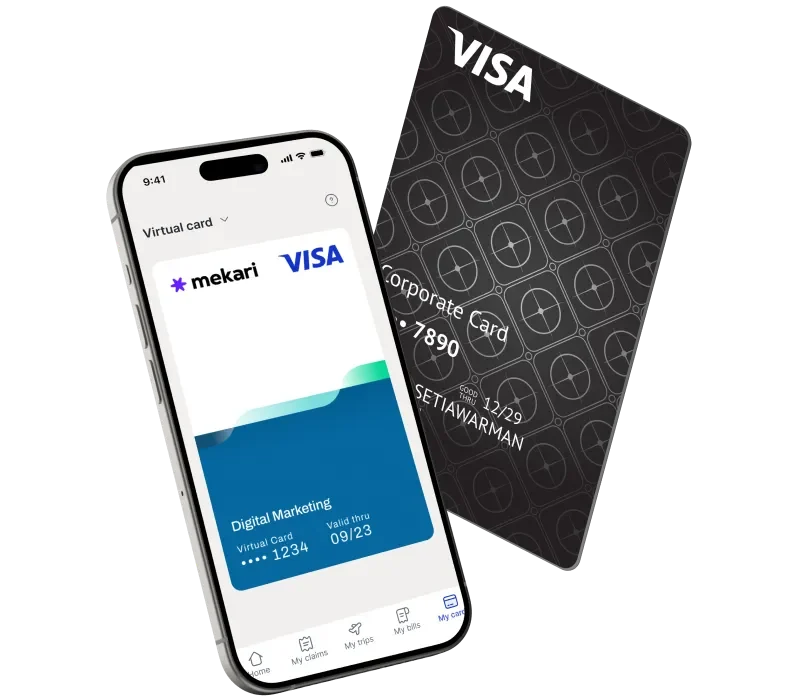
- Support field and operational expenses: Mekari Expense Physical Card lets employees pay for business purchases using company funds. Finance can set limits by employee, department, or category, monitor transactions in real time, and sync receipts to simplify reconciliation.
- Manage online payments: Mekari Expense Virtual Card supports expenses such as software subscriptions and digital advertising. Assign cards to employees, departments, or projects, set spending limits, and freeze or revoke cards when needed.
- Keep spending within policy: Mekari Expense Spend Control connects card usage with budget allocation, policy-based spending limits, and approval workflows, giving Finance greater visibility into company spending.
- Reduce reliance on employee out-of-pocket payments: With Mekari Limitless Card, businesses can issue physical and virtual cards funded by company money loaded in advance. Spending stays within the available prefunded balance, giving employees a practical payment method without relying on a revolving credit facility.
FAQ Regarding Physical vs Virtual Card
Are virtual cards safer than physical cards?
Are virtual cards safer than physical cards?
Virtual cards can offer controls such as separate payment credentials, spending limits, and card freezing, depending on the provider. These features can reduce certain risks, but overall security depends on the card program and how employees use it.
Does a virtual card always use a credit facility?
Does a virtual card always use a credit facility?
No. Virtual describes the card’s digital format, not its funding mechanism. Depending on the issuer, a virtual card may use a prefunded balance, a debit account, or a credit facility.