





Expense Report: Your Guide to Managing Reports from Submission to Reimbursement


Mekari Insight
- An expense report is a record of business expenses submitted for review, approval, and reimbursement, typically including transaction details, supporting documents, and the business purpose of each expense.
- Expense reports help companies document employee spending, review policy compliance, process reimbursements, and maintain consistent financial records.
- Mekari Expense helps companies manage employee expenses with expense management software that brings reimbursement, business travel, approvals, and expense visibility into one platform.
An expense report is a record of business expenses submitted for review, approval, and reimbursement. It typically includes details such as the date, amount, business purpose, and supporting receipts.
For finance teams, expense reports provide a structured way to review employee spending, check compliance with company policies, process reimbursements, and maintain financial records. The process can become difficult to manage when receipts, expense details, and approvals are handled across different tools.
This article explains what an expense report is, what it should include, the common types and templates, how the employee expense reporting process works, and how companies can automate it.

What Is an Expense Report?
An expense report is a document that records business expenses incurred by an employee or on behalf of a company. This report usually includes details such as transaction date, expense amount, and purpose of spending, which are then submitted to the relevant team for review and approval.
Employee expense reporting has two main functions: to ensure employees are reimbursed quickly and accurately, and to help companies track, categorize, and control expenses systematically.
To ensure the report is processed properly, the following key components must be included:
- Detailed list of expenses (by category)
- Proof of transaction such as receipts or invoices
- Employee information (name, department, position)
- Approval from manager or finance team
These components ensure transparency, accountability, and make it easier for the finance team to verify.
In practice, employee expenses vary depending on business needs. Common examples include business travel, meals and entertainment, office supplies, software and subscriptions, work-from-home expenses, and training and development. For a broader overview of these expenses, see this employee business expense guide.
Types of employee expense reporting
As businesses grow, financial reporting becomes more complex, involving multiple divisions, projects, and entities, so each report may have a different format depending on the purpose of the expense.
The following are common types of expense reports:
1. One-time reports
This type of report is generally used for single business expenses, such as lunch costs or office supply purchases. It is usually processed and approved faster because it only includes one receipt with a brief explanation.
2. Monthly or recurring reports
This type is used to handle routine monthly payments, such as software subscriptions. It contains a summary of expenses over a month to facilitate budget tracking and maintain visibility of spending.
3. Travel and mileage reports
This report is specifically used for employees who frequently travel for business. It helps organize transportation costs in one report for easier tracking and accurate reimbursement.
4. Client or project-based reports
This report is used for employees handling multiple projects simultaneously. Its purpose is to separate expenses between projects and simplify tracking.
How Does the Employee Expense Reporting Process Work?
The employee expense reporting process generally follows a consistent flow across businesses and industries:
1. Making a purchase
The first stage begins with the employee purchasing goods or services for business purposes, documented with receipts or proof of transaction.
2. Preparing the expense report
Employees need to create an expense report according to company policies.
3. Submitting the report
After the report is created, the expense report along with supporting documents is submitted to management for review.
4. Review process
The report is reviewed to ensure the expenses are accurate and comply with company policies. When multiple reviewers are involved, a multi-layer expense approval workflow can define who reviews and approves each claim.
5. Approved or rejected
If verified and approved, the report is forwarded to the finance team for recording and processing.
6. Reimbursement
After being received by the finance team, the reimbursement process is carried out and the funds are transferred to the employee’s account. For business travel claims, the travel expense reimbursement process may involve additional checks on eligible expenses and supporting documents.
Expense report templates
Here are three commonly used templates based on expense complexity:
1. Simple T&E template (entry level)
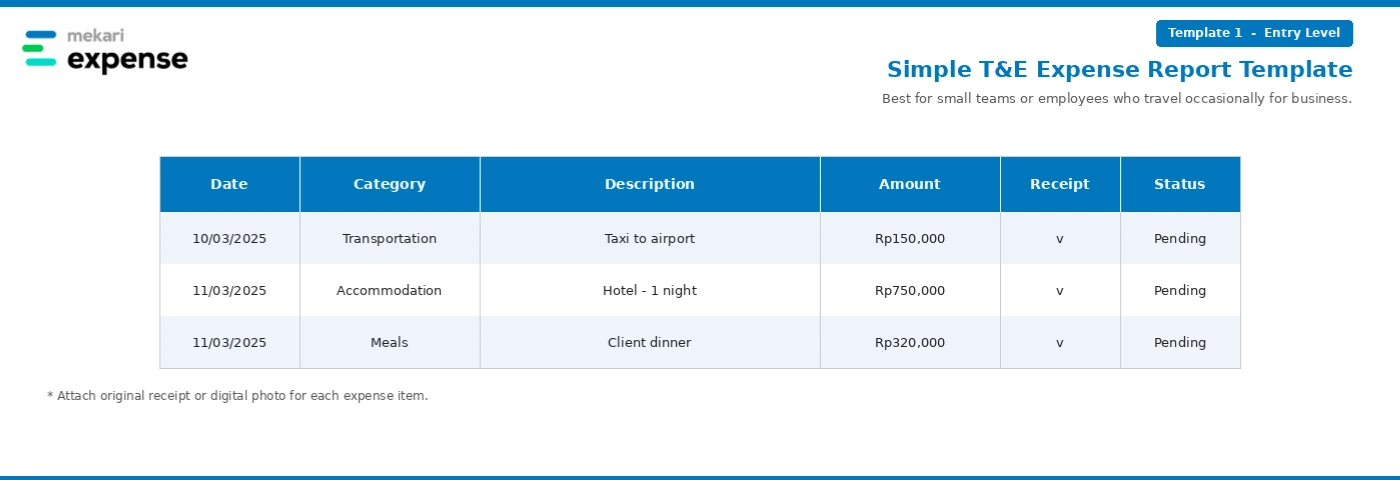
A basic template for single expenses or small companies. It typically includes columns such as date, category, description, amount, receipt, and status.
2. Project-based expense template (mid complexity)
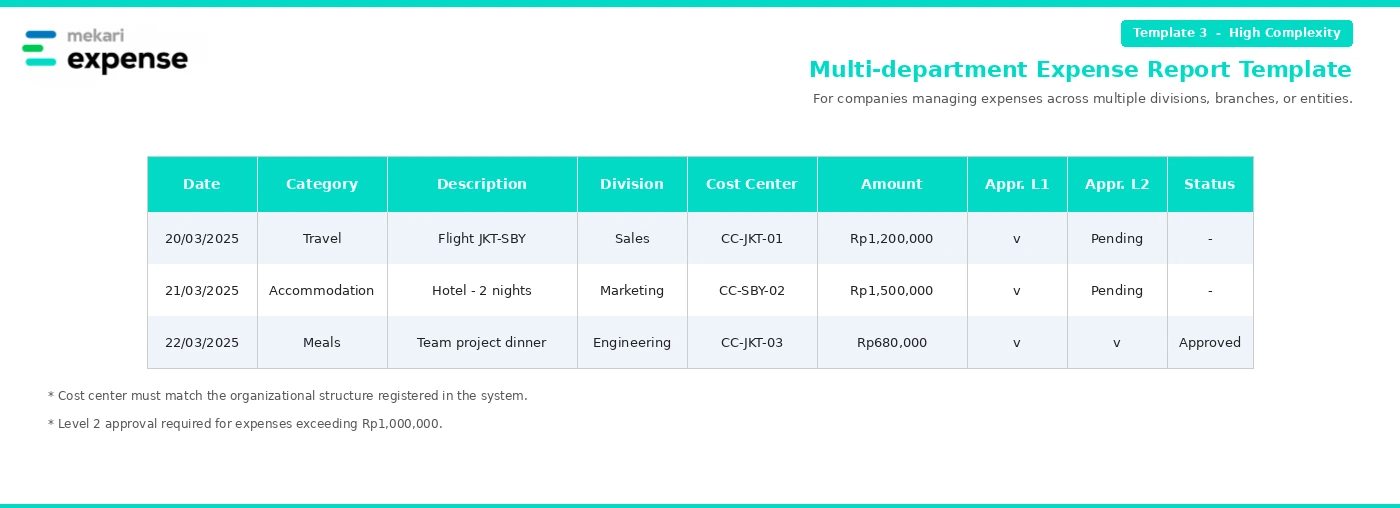
Used for employees managing multiple projects or clients. This template includes additional fields such as project code.
3. Multi-department expense template (high complexity)
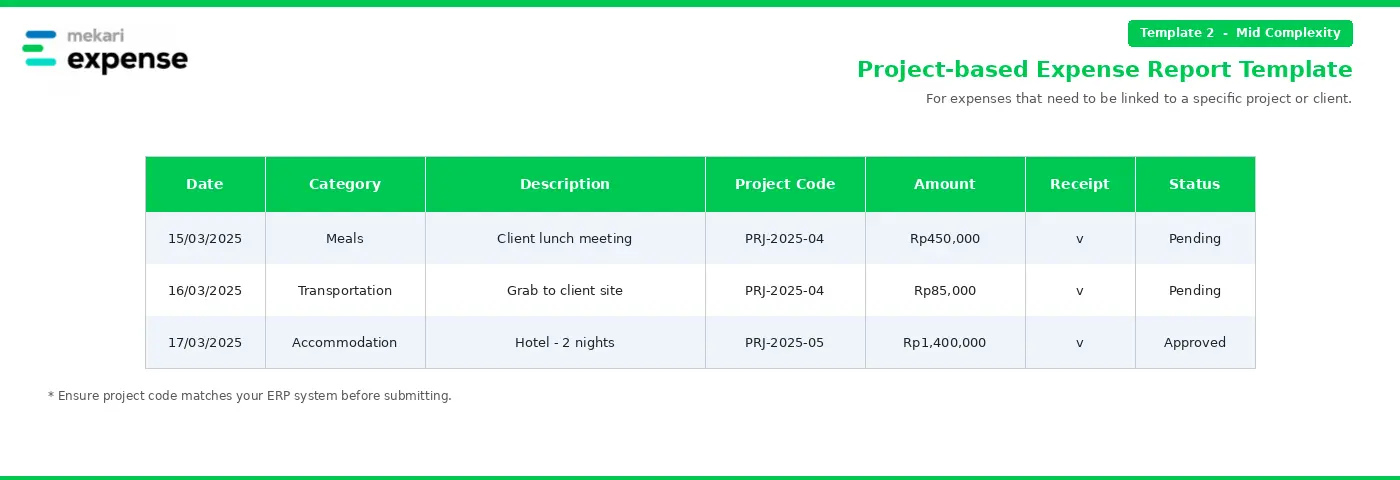
Used for companies with multiple departments and complex approval structures. It includes additional fields such as division, cost center, approval line 1, and approval line 2.
Companies looking for additional formats can also explore these business expense report templates for travel, credit card, and general business expenses.
These templates can work for teams still managing expenses manually. However, as the number of reports grows and approval structures become more complex, maintaining the process manually can create more administrative work and increase the risk of errors. At that point, an expense management system can help centralize submission, review, and reimbursement.
Benefits of automating expense reporting
Automating expense reporting can simplify workflows and reduce the costs associated with manual processing.
According to the GBTA Foundation, 1 in 5 or about 19% of expense reports contain errors or incomplete information, requiring an additional cost of $52 and 18 minutes to correct. If a company processes hundreds of claims per month, this can significantly impact operational costs.
Automation can reduce the manual work involved in checking, routing, and processing expense reports. Common benefits include:
- Financial transparency: Clear and complete reports help detect duplicate claims and overspending
- Faster and accurate reimbursement: Employees receive reimbursements quickly and accurately
- Tax compliance: Complete reports and receipts support tax deductions and audits
- Operational efficiency: Reduces manual work and input errors
How Does Mekari Expense Simplify Employee Expense Reporting?
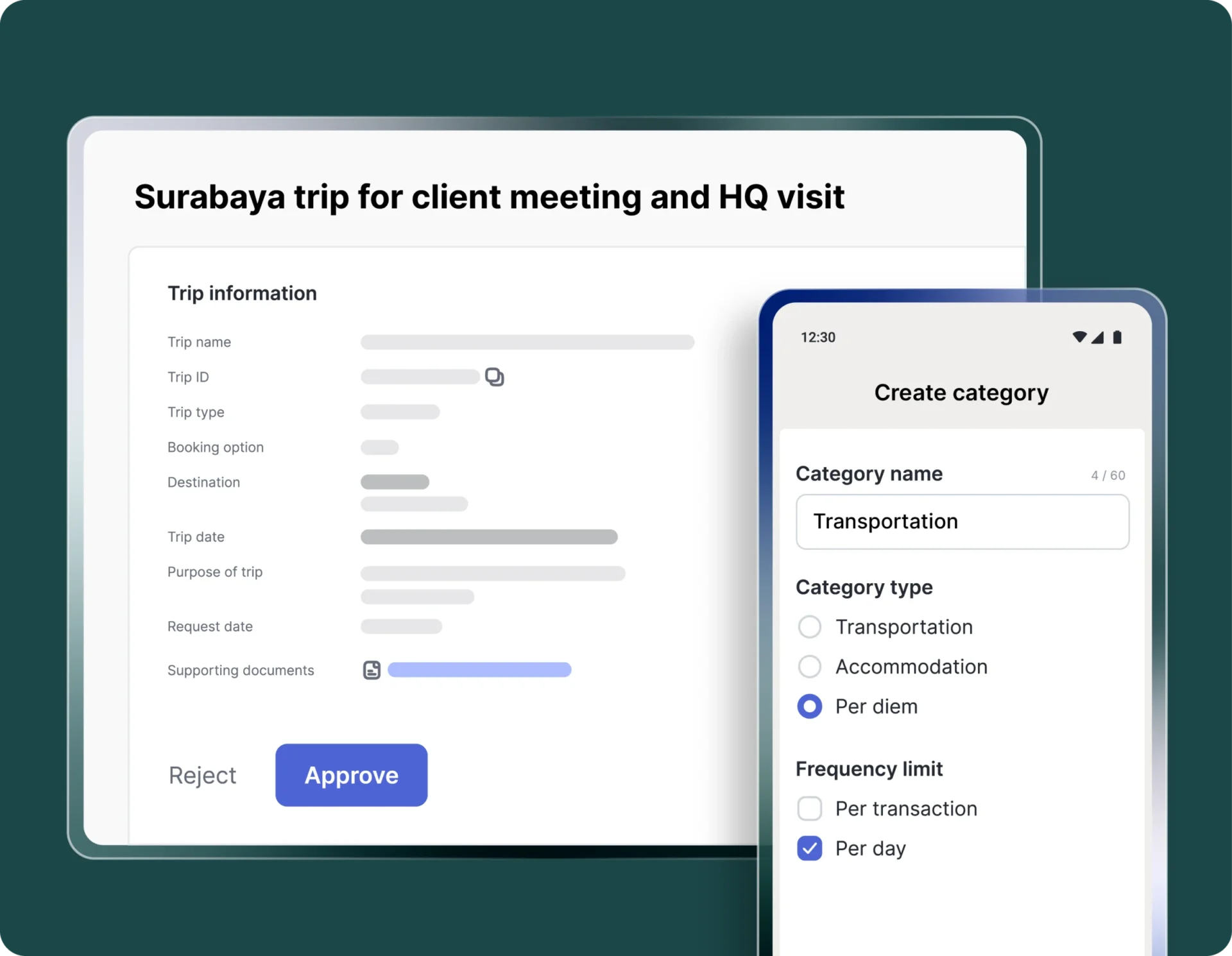
For companies with multiple branches, divisions, or active teams, managing expense reports manually can become difficult as the number of claims and approval steps increases.
Mekari Expense supports employee expense reporting through its Travel & Expense module, helping companies manage the process from submission through reimbursement within a single platform.
- Reimbursement: Faster, more accurate, and paperless claims. Employees can submit claims digitally by uploading receipts directly from the app, which are automatically routed for multi-level approval.
- Cash advance: Submit business travel advances directly from the app and automatically record them for reporting.
- Business trip: Manage travel expenses in a single automated workflow, from submission to multi-level approval and reporting.
- OCR Technology: Convert physical receipts into digital format, allowing automatic upload without manual input.
Simplify your employee expense reporting process with Mekari Expense!
References
GBTA. “How Much Do Expense Reports Really Cost a Company?”
Wise. “Expense Automation: 6 Ways to Streamline Expense Management”