





How Expense Management Automation Can Save $2.3M Annually


Mekari Insight
- Manual expense processes are costly and error-prone. Nearly 1 in 5 expense reports contains mistakes, and each error costs an average of $52 and 18 minutes to fix, inefficiencies that compound quickly as your business grows.
- Automation accelerates every stage of the expense lifecycle. From OCR-powered receipt capture to automated approval routing and faster reimbursements, expense management software removes bottlenecks and gives finance teams real-time visibility into company spending.
- Ready to take control of your business expenses? Mekari Expense is Indonesia’s #1 spend management platform, combining OCR, multi-level approvals, corporate card integration, and seamless accounting sync to help businesses reduce manual work and spend smarter.
After payroll and employee benefits, travel and entertainment (T&E) is one of the largest sources of business expenses. Given how significant these costs are, managing them through paper receipts, manual tracking, or spreadsheets is often inefficient and difficult to control.
By adopting expense management automation, companies can streamline the entire process, reduce errors, and speed up reimbursements. This not only improves efficiency but also gives businesses better visibility and control over their spending.

What is expense management automation?
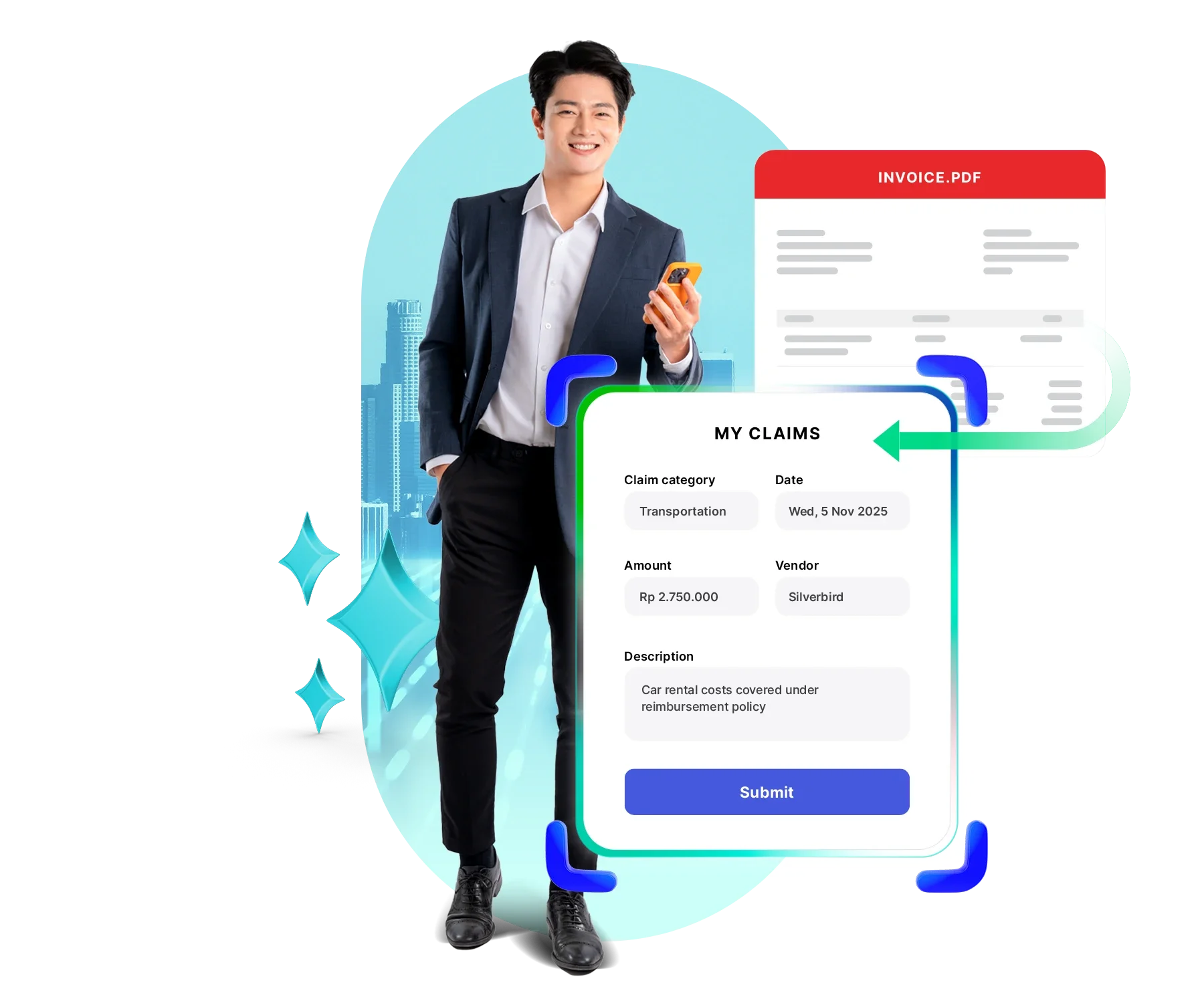
Expense management automation is software that digitizes and streamlines how businesses handle expenses. It replaces manual tasks, such as collecting paper receipts, entering data into spreadsheets, and managing approvals via email, with automated workflows.
The system automatically captures and categorizes expense data, routes submissions to the right approvers, and speeds up reimbursements. By integrating with accounting, HR, and corporate card systems, it centralizes all expense information and gives companies real-time visibility and control over their spending.
5 reasons why business need expense management automation, based on data
As businesses scale, managing expenses manually becomes increasingly inefficient, costly, and prone to errors. The following data highlights why more companies are shifting toward expense management automation.
1. Cost and time savings as business ROI
Manual expense processes are not just slow, they are expensive. According to Deloitte, 62% of payment processing costs come from labor-intensive tasks like data entry, approvals, and reconciliation. By automating these workflows, companies can significantly reduce operational costs.
The impact is measurable. A Forrester study found that businesses save over 1,800 employee hours annually through automation. In accounts payable alone, automation can cut processing costs by 60–80%, bringing the average cost per invoice down to $5 or less. Overall, companies report ROI ranging from 30% to 300%, with a median of 150% in the first year and average annual savings of up to $2.3 million.
2. Error reduction and stronger compliance
Manual expense reporting is highly prone to errors. According to GBTA, 19% of expense reports contain mistakes, and each error takes around 18 minutes and $52 to fix. These small inefficiencies quickly add up across the organization.
Expense management automation minimizes these risks by enforcing company policies automatically. With built-in validation and rule-based controls, businesses can achieve up to 99% compliance, ensuring every expense follows internal policies without constant manual review.
3. Faster reimbursement and smoother experience
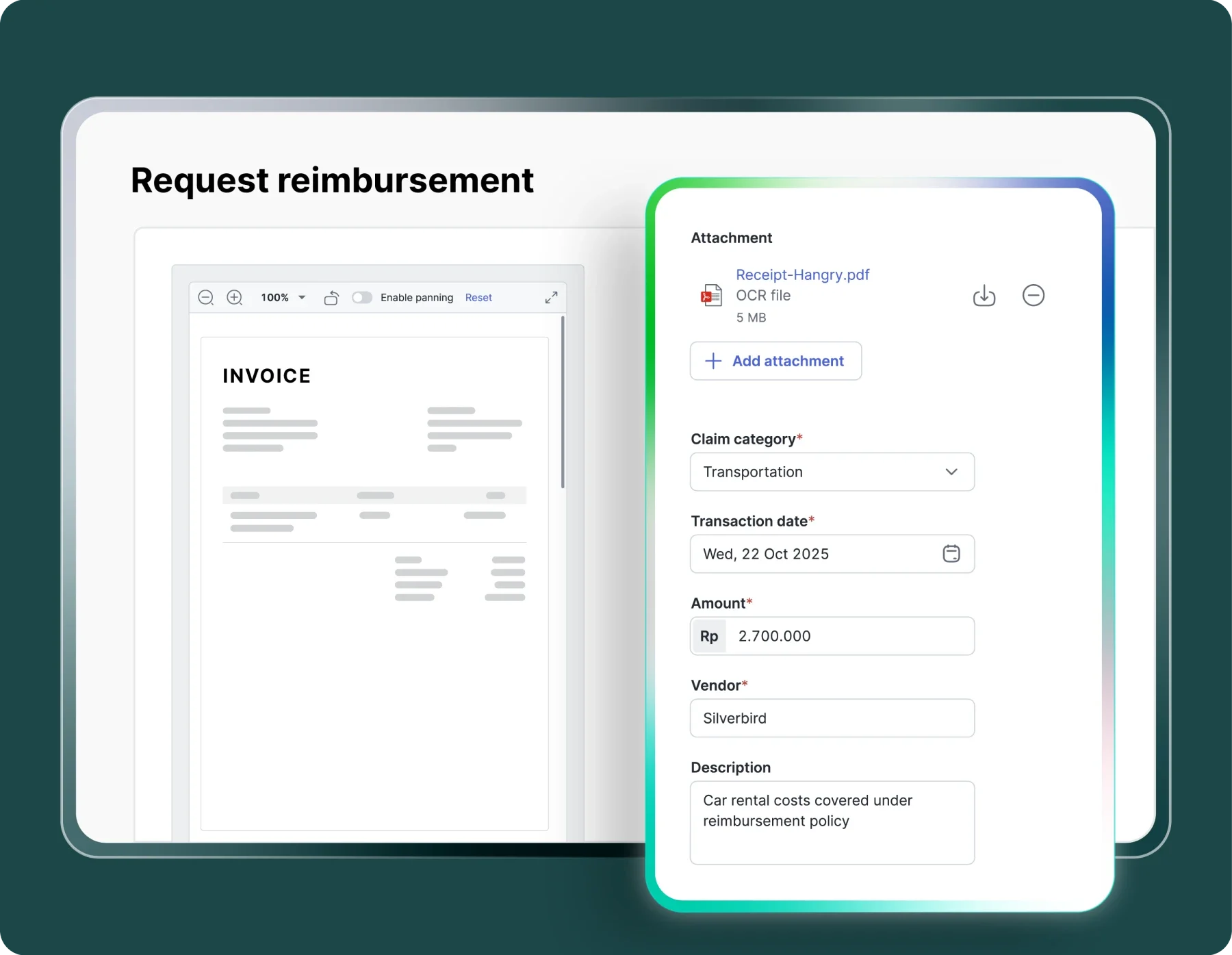
Automation dramatically improves the experience for both employees and managers. Employees can submit expenses instantly through their smartphones, without waiting to return to the office. Managers receive real-time notifications and can approve requests with just one tap, no more email chains or paper trails.
The urgency is clear. According to the American Express 2023 Expense Management Trendex survey, 59% of employees say saving time is the biggest benefit of automation. Yet today, 65% of expense processors spend over an hour reviewing monthly reports, and 76% of employees spend more than 30 minutes compiling them. It’s no surprise that 6 in 10 employees consider expense reporting their least favorite part of business travel.
4. Better data visibility for smarter decisions
Without automation, finance teams often rely on delayed, fragmented data. Expense management automation provides real-time visibility into spending across departments, categories, and employees, all in one platform.
This allows teams to drill down into specific expense categories, identify trends, and detect potential risks or non-compliance early. With better data at their fingertips, finance leaders can make faster, more informed decisions around budgeting and cost control.
5. Greater control over company spending
Automation gives businesses stronger control over how money is spent. Companies can set limits based on employee roles, departments, projects, vendors, or time periods, ensuring spending stays aligned with company policies.
In addition, businesses can track expenses against predefined budgets and receive proactive alerts when limits are approaching. This level of control helps prevent overspending before it happens, rather than reacting after the fact.
Read more: 7 Practical Ways to Reduce Company Spending & Best Software
Benefits of expense management automation for every role
Expense management automation delivers value across the organization, helping each role work more efficiently while improving visibility and control over spending.
- Finance: Reduces the burden of collecting and reconciling expense reports, especially during closing periods. Automation also flags missing documents, helps prevent fraud, identifies spending patterns, and ensures better compliance with company policies.
- Employees: Makes it easier to submit expenses through digital tools like receipt scanning and automated forms. Built-in validation reduces errors, leading to fewer revisions and faster reimbursement cycles.
- Managers: Provides clear approval workflows and real-time visibility into team expenses. Managers can review, approve, and track spending more efficiently, with centralized records available for audit or review.
- IT: Eliminates the need for manual data transfers between systems by integrating with accounting, HR, and other platforms. This reduces errors and lowers ongoing system maintenance and support requirements.
- C-suite: Offers real-time insights into company-wide spending, enabling stronger financial control and faster, data-driven decision-making that can improve overall profitability.
- Business owners: Reduces administrative workload so they can focus on strategic priorities. At the same time, better visibility into spending helps identify cost-saving opportunities, improve budget discipline, and reduce financial risks.
How does expense management automation work?
Expense management automation streamlines the entire expense lifecycle, from submission to reimbursement, by replacing manual steps with automated workflows. Here’s how the process typically works end to end:
1. Receipt capture and data extraction
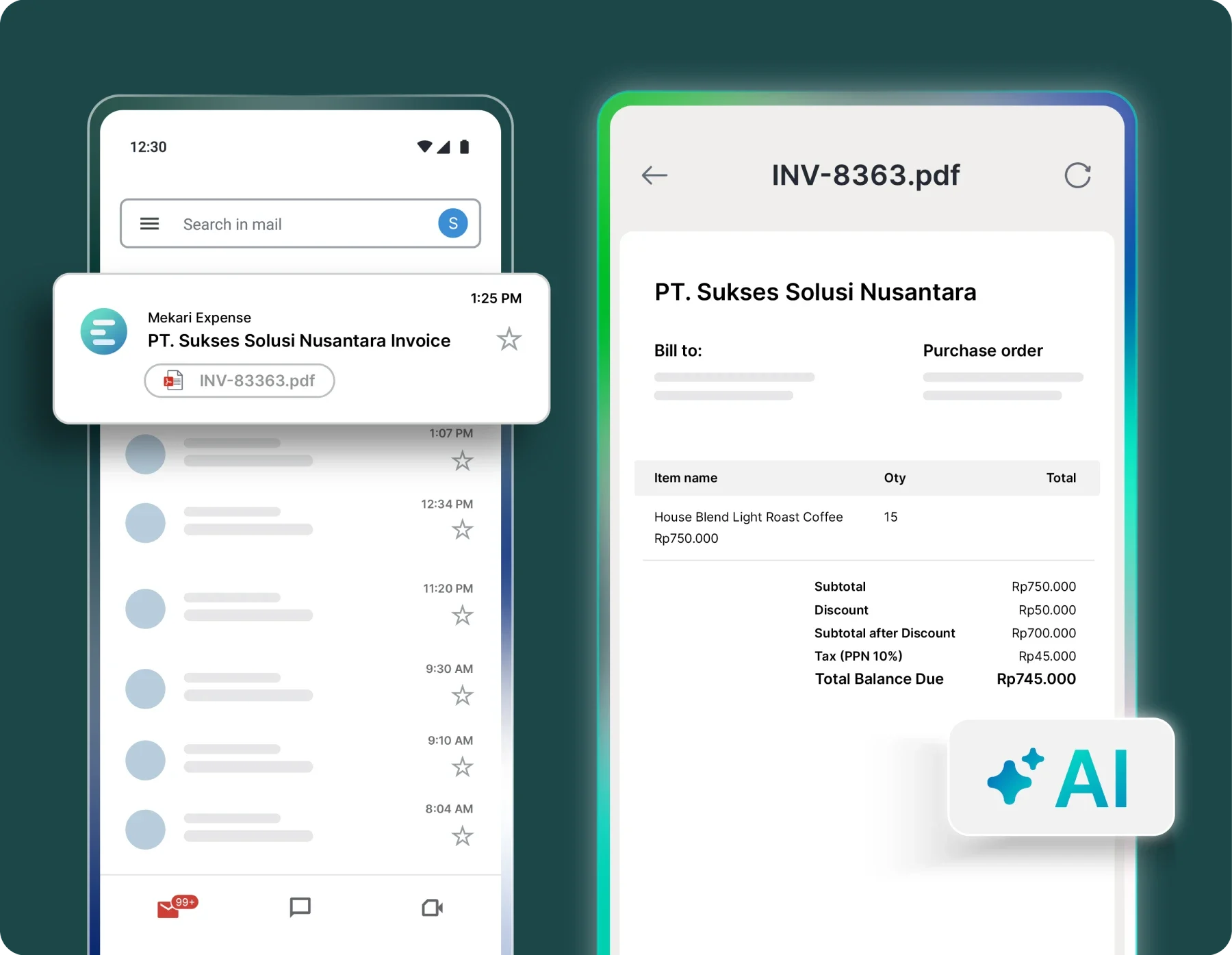
Employees submit expenses through mobile apps or web portals by uploading receipts or using corporate cards that sync transactions automatically. OCR (Optical Character Recognition) technology extracts key details such as vendor name, date, amount, and category, eliminating manual data entry.
2. Policy compliance check
Once submitted, the system automatically verifies each expense against company policies. It checks spending limits, approved categories, and required documentation, and flags any out-of-policy transactions instantly.
Read more: Legal Spend Management: Top 8 Software for Law Firms
3. Automated approval workflows
Expenses are routed to the appropriate managers or department heads based on predefined rules. This enables faster approvals with clear and trackable workflows, without relying on emails or manual follow-ups.
4. ERP and accounting integration
After approval, expense data is automatically synced with accounting, payroll, or ERP systems. This keeps financial records up to date and reduces the need for manual reconciliation.
5. Reimbursement processing
The system then initiates reimbursement automatically. Payments are processed quickly through integrated methods, improving efficiency and employee satisfaction.
Manual vs automated expense management: a side-by-side comparison
While understanding how expense management automation works is important, the real impact becomes clearer when compared directly to manual processes. Here’s how the two approaches differ across key aspects:
| Feature / Aspect | Manual Process | Automated System |
|---|---|---|
| Receipt Handling | Paper receipts collected manually, printed or emailed; risk of loss or damage | Auto-matched via OCR or email sync; digital storage with instant capture |
| Data Entry | Manual input into spreadsheets; prone to typos and errors | Automatic extraction and categorization; minimal human intervention |
| Policy Enforcement | Reviewer-dependent; inconsistent application; violations caught late | Programmatic, real-time enforcement; auto-flag or block non-compliant spend |
| Approval Routing | Email chains; physical handoffs; delays when approvers unavailable | Custom logic with instant routing; dynamic workflows; mobile approvals |
| Processing Time | 20+ minutes per report; hours for complex reviews | Minutes or seconds; automated processing with exception-only review |
| Accounting Sync | Batch uploads; manual data re-entry; error-prone reconciliation | Real-time sync with pre-coded GL entries; seamless ERP integration |
| Reimbursement Speed | Weeks to process; delayed by month-end batching | Days or hours; auto-approved compliant reports processed immediately |
| Error Rate | 19% of reports contain errors; $52 average cost to correct each error | Dramatically reduced errors; AI validation catches discrepancies in real-time |
| Fraud Detection | Difficult to detect; relies on manual review and memory | AI-powered anomaly detection; duplicate detection; pattern recognition |
| Visibility & Reporting | Limited; wait until month-end; scattered across spreadsheets | Real-time dashboards; comprehensive analytics; instant insights |
| Audit Trail | Paper-based; difficult to retrieve; incomplete documentation | Complete digital trail; every action logged; audit-ready reports |
| Scalability | Requires more headcount as company grows; linear cost increase | Scales without additional headcount; handles volume increases easily |
Read more: How to Prevent Spending Leakages & Recommended Software
Essential features to look for expense management automation software
To get the most value from expense management automation, it’s important to choose a solution with features that support accuracy, control, and ease of use.
- Data extraction: OCR technology automatically captures key data from receipts, reducing manual input
- Policy enforcement: Built-in rules check expenses against company policies in real time
- Reporting and analytics: Provides real-time insights into budgets, spending trends, and anomalies
- Approval workflows: Customizable multi-level approval flows based on roles or expense types
- Expense report creation: Automatically categorizes expenses, calculates totals, and compiles reports
- Integrations: Connects seamlessly with ERP, accounting systems, HR tools, and corporate cards
- Mobile accessibility: Enables employees to submit and track expenses anytime, anywhere
How to implement expense management automation: step-by-step guide
Implementing expense management automation is not just about choosing software. It requires proper setup, integration, and adoption to ensure the system delivers real value across the organization.
1. Research and evaluate solutions
Start by identifying your business needs and current pain points. Compare different tools based on key features such as OCR, policy enforcement, integrations, and reporting capabilities. Make sure the system is user-friendly and scalable so it can grow with your company.
2. Choose the right software
After narrowing down options, select a solution that fits your workflows and integrates well with your existing systems. Cloud-based platforms with AI capabilities are often preferred for flexibility and automation. Also consider vendor reliability, customer support, and long-term product roadmap.
3. Integrate with accounting and finance systems
Connect the expense management system with your accounting, ERP, and payroll tools. This step is critical to eliminate manual data entry and ensure all approved expenses flow directly into your general ledger for accurate financial reporting.
4. Upload and configure expense policies
Define and input your company’s expense policies into the system. This includes spending limits, approved expense categories, required documentation, and reimbursement rules. Once configured, the system can automatically validate every submitted expense against these rules.
5. Incorporate corporate cards
If your company uses corporate cards, integrate them into the platform. This allows transactions to be automatically imported and matched with receipts, reducing the need for manual reporting and improving accuracy.
6. Set up automated approval workflows
Design approval flows based on your organizational structure. You can set rules for routing expenses based on amount, department, or category. Enable notifications so approvers are alerted instantly, helping speed up the approval process.
7. Implement compliance and validation checks
Activate automated checks to ensure every expense meets company policies. The system can flag missing receipts, detect duplicate submissions, and identify unusual spending patterns, helping reduce fraud and errors.
8. Train employees and stakeholders
Provide comprehensive training for all users, including employees who submit expenses, managers who approve them, and finance teams who analyze reports. Clear guidance ensures higher adoption and reduces resistance to change.
9. Monitor, evaluate, and optimize
After implementation, continuously monitor system usage and performance. Review reports to identify inefficiencies, adjust policies if needed, and optimize workflows to maximize the benefits of automation over time.
How Mekari Expense can automate your expense management
If you’re looking to implement expense management automation effectively, Mekari Expense stands out as Indonesia’s #1 spend management platform, built specifically to support local business needs and regulatory requirements. It is also a strong choice for global companies expanding into Indonesia, ensuring compliance while maintaining efficient financial operations.
Mekari Expense brings together key automation features in one unified platform:
- OCR technology to automatically extract and categorize receipt data
- Multi-level approval workflows to ensure faster and structured approvals
- Corporate cards integration for real-time transaction tracking
- Automatic disbursement to speed up reimbursement processes
- 3-way matching invoice processing to validate transactions and reduce errors
- Seamless integration with Mekari Jurnal for real-time accounting and financial reporting
By centralizing and automating the entire expense process, Mekari Expense helps businesses reduce manual work, improve compliance, and gain full visibility into company spending.
Explore how Mekari Expense can transform your expense management.
References
Abbyy. ‘’Why Businesses Need Expense Management Automation in 2026’’
Netsuite. ‘’Expense Management Automation: How to Automate Approvals and Reports’’
Tipalti. ‘’Why Expense Management Automation is Crucial for Businesses’’
FAQ
1. How is expense management automation different from just using spreadsheets?
1. How is expense management automation different from just using spreadsheets?
Spreadsheets still require manual data entry, offer no real-time policy enforcement, and provide no audit trail. Expense management automation replaces these tasks entirely, capturing receipt data automatically via OCR, enforcing spending policies in real time, and syncing approved expenses directly with your accounting system.
2. How long does it take to implement expense management automation?
2. How long does it take to implement expense management automation?
Implementation timelines vary by company size and complexity, but the core steps, selecting a solution, integrating with existing accounting or ERP systems, configuring expense policies, and training employees, can typically be completed in a structured, phased rollout. Choosing a platform with strong integration support and local compliance features, like Mekari Expense, can shorten this timeline significantly.
3. Will expense automation work for employees who aren't tech-savvy?
3. Will expense automation work for employees who aren't tech-savvy?
Yes. Modern expense management platforms are designed with ease of use in mind. Employees can submit expenses directly from their smartphones by photographing receipts, with the system handling data extraction and categorization automatically. Managers can approve requests in one tap via mobile, no complex workflows required.
4. Is expense automation only suitable for large enterprises?
4. Is expense automation only suitable for large enterprises?
No. While large organizations benefit from the scalability, the efficiency gains apply at every company size. For growing businesses especially, automation prevents the need to hire additional headcount just to manage increasing expense volume, keeping operational costs lean as the company scales.