





Free Business Expense Report Templates to Fix the 19% Error Rate

Mekari Insight
- A business expense report is a standardized document employees submit to record business-related spending across vendors, categories, and amounts for reimbursement and audit compliance.
- Manual templates standardize submission format but leave approvals in email, policy checks reactive, and reconciliation on the finance team at period end.
- Mekari Expense replaces manual templates with an end-to-end spend management system that enforces policy at submission, automates approval routing, and delivers real-time spend visibility across all departments.
Inconsistent expense submissions slow down reimbursements, create reconciliation gaps, and put unnecessary pressure on finance teams every month.
The GBTA Foundation reports that the average expense report takes 20 minutes to complete and costs $58 to process, and that is before factoring in the 19% of reports that require correction.
A standardized business expense report template reduces this friction by ensuring employees capture the right information in the right format every time they submit.
The template functions as both a compliance tool and an efficiency driver, aligning employee submissions with the fields finance needs to approve and record spending accurately.
Download one of the three free templates below and use the guide in this article to implement a reporting process your team can actually follow consistently.

What Is a Business Expense Report?
A business expense report is an itemized form employees submit to record spending made on behalf of the company during a specific period.
This standardized document captures each transaction’s essential details: date, amount, vendor, category, and business purpose, along with receipt documentation.
Expense reports serve two distinct functions depending on who is using them:
| Function | Who It Serves | What It Does |
|---|---|---|
| Reimbursement request | Employees | Formal mechanism for claiming back out-of-pocket spending, routed through an approval workflow before payment is issued |
| Financial control record | Finance / company | Tracks where money is going, supports budget reconciliation, and creates an audit-ready record of business expenditure |
Most companies require business expense report submission on a weekly or monthly cycle, with receipts attached for each claimed item before the report reaches the finance team for review.
What Should a Business Expense Report Include?
A complete expense report gives finance teams everything they need to verify, approve, and record a claim without follow-up.
The fields below apply across all report types, whether for general expenses, travel, or corporate card reconciliation.
- Employee information: Name, department, employee ID, and direct manager for accountability and approval routing.
- Date of expense: When the expense was incurred, not when the report was submitted.
- Expense category: Transportation, meals, accommodation, office supplies, software subscriptions, and similar classifications that map to your company’s chart of accounts.
- Vendor or merchant name: Who was paid, and for what product or service.
- Amount and currency: Total cost per line item, with subtotals by category and a grand total at the bottom.
- Business purpose: A brief justification linking the expense to a specific work activity, project, or client.
- Payment method: Whether the expense was paid via personal funds, corporate card, or cash advance.
- Receipt reference: Attached documentation supporting each line item, required for audit compliance and tax purposes.
- Approval field: Manager or finance team sign-off, either as a physical signature or a tracked digital approval.
All three templates in this article are pre-built with these fields included.
Free Business Expense Report Templates
The three templates below cover the most common expense reporting scenarios businesses encounter.
Each is available as a free Excel download and includes pre-built formulas, categorized line items, and approval fields ready to use.
Customize the expense categories, currency, and company header before distributing to your team.
1. Simple Business Expense Report Template
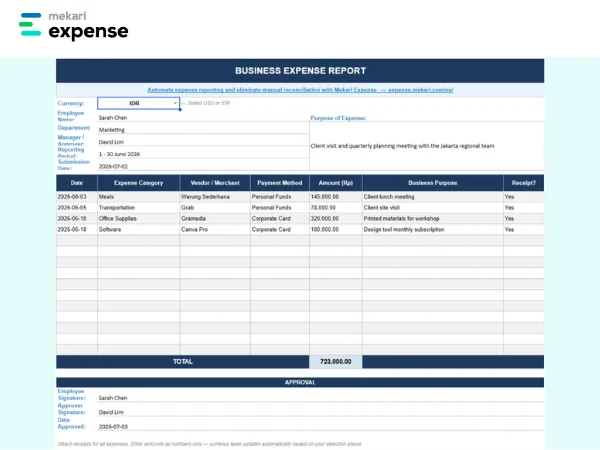
The simple expense report template is the most versatile starting point for businesses standardizing their reporting process for the first time.
- What it’s for: General day-to-day business expenses including office supplies, client meals, software subscriptions, and miscellaneous purchases.
- Who uses it: Employees across all departments who incur out-of-pocket expenses on an ad hoc or recurring basis.
- What’s included: Employee info header, date, expense category, vendor, amount, business purpose, payment method, receipt reference, category subtotals, grand total, and approval field.
[Download Simple Business Expense Report Template — Excel]
2. Business Travel Expense Report Template
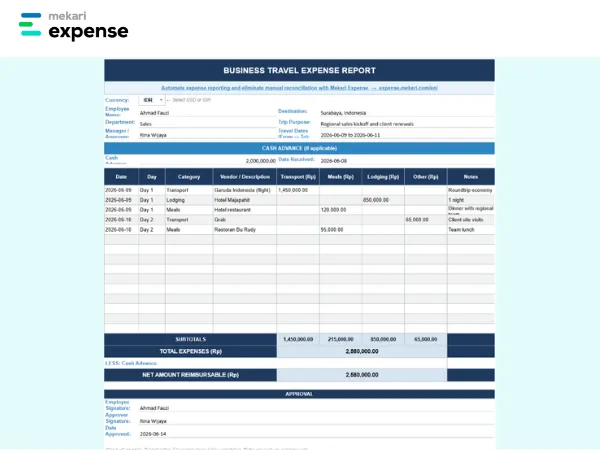
The travel expense report template is structured for multi-day trips where expenses span multiple categories across consecutive days.
- What it’s for: Business trips covering flights, accommodation, ground transport, meals, and per diems.
- Who uses it: Employees on domestic or international business travel and finance teams processing travel reimbursements.
- What’s included: Trip details header (destination, dates, purpose), daily expense rows itemized by category, cash advance reconciliation row, net reimbursable total, and approval field.
[Download Business Travel Expense Report Template — Excel]
3. Corporate Card Expense Report Template
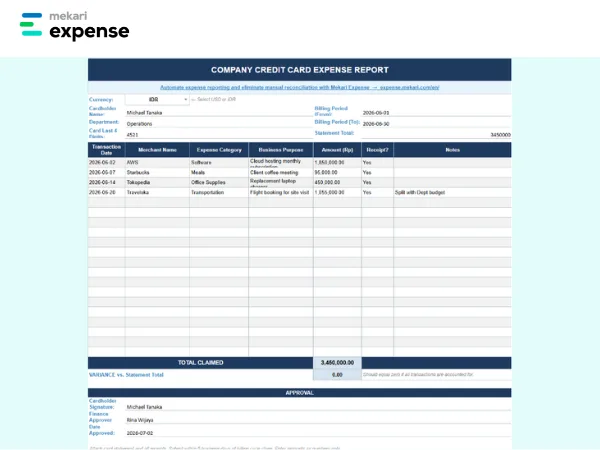
The corporate card expense report template is designed for reconciling corporate card transactions at the end of each billing period.
- What it’s for: Monthly reconciliation of company-issued card spending, matching each transaction to a business purpose and receipt.
- Who uses it: Employees with corporate cards and finance teams running end-of-cycle card reconciliation.
- What’s included: Cardholder info, billing period, transaction-by-transaction rows (date, merchant, category, amount, business purpose), receipt reference column, total claimed, variance row against statement total, and finance sign-off field.
[Download Corporate Card Expense Report Template — Excel]
How to Use an Expense Report Template
Setting up a consistent submission process matters as much as the template itself. Follow these steps to move from a blank template to an approved, reimbursed report.
- Download and customize the template: Add your company name, design logo, expense categories, and approval hierarchy before distributing to employees. Align the category columns to your chart of accounts to avoid reclassification work during reconciliation.
- Fill in expenses as they occur: Record each expense on the same day where possible. Delayed entry increases the risk of missing receipts, forgotten details, and mismatched amounts.
- Attach supporting receipts: Link or attach a digital receipt to each line item. Most companies require receipts for expenses above a defined threshold, typically set in the expense policy.
- Verify totals before submission: The Excel templates use built-in formulas for category subtotals and the grand total. Confirm figures are correct before routing the report for approval.
- Submit for approval: Send the completed report to the designated approver per your company’s expense policy, with all receipt attachments included.
- Track reimbursement status: Follow up with finance if reimbursement has not been processed within the company’s stated timeline.
While these steps work well for small teams and low transaction volumes, manual submission and tracking becomes a bottleneck as the number of reports and approvers grows.
Limitations of Manual Expense Report Templates
Templates are a practical starting point, but they introduce compounding inefficiencies as transaction volume and team size grow.
- Error-prone data entry: Manual input leads to miscalculated totals, wrong categories, and missing fields that delay approval and require back-and-forth corrections. The GBTA Foundation found that 19% of expense reports contain errors, with each correction adding $52 and 18 minutes of additional work.
- No real-time visibility: Finance teams cannot see spending as it happens. Reports only surface after submission, making budget monitoring reactive rather than proactive.
- Slow approval cycles: Without automated routing, reports sit in email inboxes waiting for manager action, delaying reimbursements and creating friction for employees.
- No policy enforcement at point of submission: Employees can submit out-of-policy expenses without any system-level check. Violations are caught after the fact, if at all.
- Reconciliation burden: Matching submitted reports against bank statements, corporate card feeds, and accounting records manually is time-intensive for finance teams and prone to its own errors.
- Audit risk: Incomplete or inconsistent manual records create compliance gaps that are difficult to defend under scrutiny.
For companies managing high expense volumes across multiple departments, automating the process eliminates these gaps at the source rather than correcting them downstream.
The shift to automation closes these gaps at the source.
According to an Aberdeen expense and invoice management survey cited via SAP Concur, best-in-class companies that adopt automated spend management report 33% fewer costs to process expense claims.
That reduction compounds as transaction volume grows.
Automate Expense Reporting with Mekari Expense
Free templates standardize how employees submit expense reports, but they do not solve the underlying process.
Approvals still route through email, policy checks still happen manually, and reconciliation still falls on the finance team.
Mekari Expense replaces this manual workflow with an end-to-end spend management system that automates the entire expense reporting cycle, from submission to reimbursement, within a single platform.
Mekari Expense’s expense reporting key capabilities for both companies and employees:
- OCR receipt scanning: Employees photograph receipts via mobile and the system automatically extracts merchant name, amount, date, and category, eliminating manual data entry at the point of submission.
- Automated expense report generation: Scanned receipts and transaction data are compiled into structured reports automatically, without manual assembly by the employee.
- Multi-level approval workflows: Approval routing is configured to match your organizational hierarchy and expense policies. Every request is automatically directed to the right approver with real-time status tracking, replacing email-based chasing.
- Spend policy enforcement: Custom policies validate each claim at the point of submission based on expense category, spending limits, employee position, and required documentation. Non-compliant submissions are flagged or rejected before they reach the approver.
- Real-time spend visibility: Finance teams monitor all employee spending across departments, projects, and branches from a centralized dashboard, with data available as transactions occur rather than at period end.
- Automatic reimbursement disbursement: Once approved, reimbursements are transferred directly to employee bank accounts without manual processing, completing the cycle up to 2x faster than manual methods.
- Mekari unified ecosystem integration: Mekari Expense is part of Mekari’s unified software ecosystem, connecting approved expenses directly with accounting, HR, and other business systems within the same platform, eliminating manual reconciliation across disconnected tools.
Automate expense reporting, eliminate manual reconciliation, and enforce spending policies from submission to reimbursement with Mekari Expense.
References and methodology
Methodology
Methodology
Articles published by Mekari Expense are developed using trusted sources, including official data, company reports, academic research, and insights from industry practitioners. Whenever possible, we refer directly to primary sources before drawing conclusions. Our editorial team reviews and verifies the information to ensure accuracy and relevance. All references are listed so readers can trace each piece of information back to its original source.
Our editorial standards
Our editorial standards
- Primary source first: We consult official product documentation and pricing pages directly, not secondhand summaries or aggregator sites.
- Fact-checking: All product features, pricing, and claims are cross-verified against each platform’s official website at the time of writing.
- No paid placement: Tools are selected based on relevance and fit for Indonesian businesses, not commercial arrangements. Mekari Expense is included as a first-party product and is transparently labeled as such.
- Regular review: Articles are periodically updated to reflect product changes or shifts in market relevance.
References
References
Adobe. “What is a business expense report template”
FAQ
1. What is the difference between an expense report and an expense policy?
1. What is the difference between an expense report and an expense policy?
An expense report is the document employees fill out to record and submit spending. An expense policy is the company rulebook that defines what qualifies as a reimbursable expense, spending limits per category, and the documentation required for each claim.
2. How do corporate card expense report templates differ from reimbursement templates?
2. How do corporate card expense report templates differ from reimbursement templates?
A corporate card expense report reconciles transactions that have already been charged to a company-issued card against the billing statement, matching each transaction to a business purpose and receipt. A reimbursement template documents out-of-pocket spending that the employee has personally funded and is requesting the company to repay.
3. What approval workflow structure should a mid-market company use for expense reports?
3. What approval workflow structure should a mid-market company use for expense reports?
Most mid-market companies use a two-tier structure: direct manager approval for standard claims within policy limits, and a second finance team approval for claims above a defined threshold or flagged for exceptions. As headcount and transaction volume grow, configurable multi-level workflows become necessary to maintain control without creating bottlenecks.
4. How long should companies retain approved expense reports for tax compliance?
4. How long should companies retain approved expense reports for tax compliance?
Most tax authorities require businesses to retain expense records for a minimum of five to seven years. For companies operating across multiple jurisdictions, retention requirements vary by country and should be aligned with the most stringent applicable regulation across all operating entities.
5. How does Mekari Expense support finance teams managing high-volume expense reporting across multiple departments?
5. How does Mekari Expense support finance teams managing high-volume expense reporting across multiple departments?
Mekari Expense centralizes the full expense reporting cycle across departments, branches, and employee levels within a single platform, enforcing spend policies at submission, routing approvals through configurable multi-level workflows, and providing finance teams with real-time visibility into all spending without waiting for period-end reports.